Sunday, October 20, 2013

is count(1) faster than count(*)?

Recently I saw a post regarding the count(1) and count(*)

the post said "
You know that doing COUNT(*) on a table with a lot of columns and a lot of rows can take a lot of time and memory
"
so use count(1) instead of count(*).  Is count(1) really faster than count(*)? Is it true? let's do testing.

first, let's setup the testing db 

--Create DB
CREATE DATABASE [test]
 CONTAINMENT = NONE
 ON  PRIMARY 
( NAME = N'test', FILENAME = N'C:\Program Files\Microsoft SQL Server\MSSQL11.SQL2012\MSSQL\DATA\test.mdf' , SIZE = 512000KB , FILEGROWTH = 102400KB )
 LOG ON 
( NAME = N'test_log', FILENAME = N'C:\Program Files\Microsoft SQL Server\MSSQL11.SQL2012\MSSQL\DATA\test_log.ldf' , SIZE = 102400KB , FILEGROWTH = 102400KB )
GO
use [test]
go


1. Heap Table

--Create Heap table
CREATE SEQUENCE dbo.mysequence
      START WITH 1
      INCREMENT BY 1
GO
select NEXT VALUE FOR dbo.mysequence AS [ID],
a.name, b.create_date,
c.type_desc into mytable 
from sys.objects a, sys.objects b, sys.objects c
GO
--Save table page status
CREATE TABLE DBCCResult (
PageFID NVARCHAR(200),
PagePID NVARCHAR(200),
IAMFID NVARCHAR(200),
IAMPID NVARCHAR(200),
ObjectID NVARCHAR(200),
IndexID NVARCHAR(200),
PartitionNumber NVARCHAR(200),
PartitionID NVARCHAR(200),
iam_chain_type NVARCHAR(200),
PageType NVARCHAR(200),
IndexLevel NVARCHAR(200),
NextPageFID NVARCHAR(200),
NextPagePID NVARCHAR(200),
PrevPageFID NVARCHAR(200),
PrevPagePID NVARCHAR(200)
)
GO

INSERT INTO DBCCResult EXEC ('DBCC IND(test,mytable,-1) ')
GO
--with DBCC IND, we can know there are total 4747 pages in table mytable

a) test count(*)
--Clean Cache
DBCC FREEPROCCACHE
DBCC DROPCLEANBUFFERS
GO
--test count(*)
SET STATISTICS IO ON
set STATISTICS time on
set STATISTICS profile on
GO
select count(*) from mytable
GO
set STATISTICS profile off
set STATISTICS time off
set STATISTICS io off
GO
--save all buffer pool page
select * into Buffer1
from sys.dm_os_buffer_descriptors where database_id=db_id('test')
GO
--check if all data pages have been read to buffer pool
select count(*)

from Buffer1 b inner join DBCCResult d on b.page_id=d.PagePID 

below is the execution plan and IO statistics


and it shows all 4747 pages have been read to buffer pool

b) test count(1)
--Clean Cache
DBCC FREEPROCCACHE
DBCC DROPCLEANBUFFERS
GO
--test count(1)
SET STATISTICS IO ON
set STATISTICS time on
set STATISTICS profile on
GO
select count(1) from mytable
GO
set STATISTICS profile off
set STATISTICS time off
set STATISTICS io off
GO
--save all buffer pool page
select * into Buffer2
from sys.dm_os_buffer_descriptors where database_id=db_id('test')
GO
--check if all data pages have been read to buffer pool
select count(*)
from Buffer2 b inner join DBCCResult d on b.page_id=d.PagePID

you will see the execution plan is the same as count(*), and so is IO statistics


and you can see 4747 pages read to buffer pool as well.

2. Clustered Index Table

created clustered index on table

ALTER TABLE dbo.mytable ADD CONSTRAINT
PK_mytable PRIMARY KEY CLUSTERED 
(
ID
)  ON [PRIMARY]

GO

and rerun the test upper, I still got the same result against count(1) and count(*), they both use clustered index scan(table scan), and read the same page into buffer pool


3. Heap + Non-Clustered Index

create the heap table with the script of first testing, then create non-clustered index below. 
CREATE NONCLUSTERED INDEX IX_mytable_date ON dbo.mytable
(
create_date
) WITH( STATISTICS_NORECOMPUTE = OFF, IGNORE_DUP_KEY = OFF, ALLOW_ROW_LOCKS = ON, ALLOW_PAGE_LOCKS = ON) ON [PRIMARY]
GO


then rerun the testing with count(1) and count*), still no difference, same execution plan and io statistics. but we see index scan this time, which is expected.


so based on my testing, there is no performance difference between them, if you see any difference between count(1) and count(*), please let me know , I am interesting on researching it :)

Tuesday, October 1, 2013

Enable Instant File Initialization to accelerate database restore

Today my colleague come to me and ask me why her database restore query was hang. She was going to restore a database with 200GB data file and 11GB log file.

She had run the restore command for about 15 minutes, but the restore process is still in 0%, it is not the normal situation she knows. I connected to the server and checked the running query status, the "restore database" command was waiting for the "ASYNC_IO_COMPLETION"


then I checked the disk performance, the database file is still in writing, 110MB/sec


before the database restore start writing data back to the data file, the data file needs to be initialized first. if instant file initialization is enabled, this step will be skipped for data file(only data file), looks like instant file initialization is not enabled on this server.

In order to prove it, I run the script from http://blogs.msdn.com/b/sql_pfe_blog/archive/2009/12/23/how-and-why-to-enable-instant-file-initialization.aspx

DBCC TRACEON(3004,3605,-1)
GO
CREATE DATABASE TestFileZero
GO
EXEC sp_readerrorlog
GO
DROP DATABASE TestFileZero
GO
DBCC TRACEOFF(3004,3605,-1)

in the error log file, I do see the
2013-10-01 18:31:05.56 spid104     Zeroing E:\Program Files\Microsoft SQL Server\MSSQL10_50.MSSQLSERVER\MSSQL\DATA\TestFileZero.mdf from page 0 to 131232 (0x0 to 0x40140000)

so the server is not enabled  instant file initialization. the data file is 200GB, disk write speed is 100-110MB/sec, we get : the file initialization will take about 33 minutes.

I told her just waited for half hour, then you would see the progress. and finally, she told me the restore estimate time started changing after 35 minutes :)

This case proves that enabling Instant File Initialization is really important for sql performance, including database restore.


Tuesday, September 24, 2013

List all mapping users of SQL login account

Find a useful system store procedure to list all mapping user of SQL login account.

sp_msloginmappings @Loginname , @Flags

@loginname: the login account name, If loginname is not specified, results are returned for the login accounts
@Flags: value can be 0 and 1, by default 0. 0 means show mapping user in all databases. 1 indicates how mapping user in current database context.

here is sample:
sp_msloginmappings 'test'
show mapping user account info in all databases for login account 'test'

sp_msloginmappings 'test', 1
show mapping user account info in current databases context for login account 'test'

BTW, SQLPS has same function:
(dir sqlserver:\sql\servername\instancename\logins) | foreach { $_.EnumDatabaseMappings()}

Thursday, September 19, 2013

Get SQL Command Compile time

1. SET STATISTICS TIME ON
It not only tell you the compile time of sql command, but also show you the execution times. when you enable it, all the sql command in the current session will be impacted, so it is a good tool to troubleshooting  only 1 sql command at a time, and it can not get compile time of sql command in other sessions.

USE [AdventureWorks]
GO
set statistics time on
go
exec [uspGetManagerEmployees] 100
go
set statistics time off
go

it will show the compile time as below:

SQL Server parse and compile time: 
   CPU time = 31 ms, elapsed time = 62 ms.

if you run the command again, you will get

SQL Server parse and compile time: 
   CPU time = 0 ms, elapsed time = 0 ms.

that's because execution plan has been in the cache, so no compile needed this time.

2. SQL Profiler (or SQL Trace)
SQL Profiler(Trace) can monitor and get sql command compile time in any client session. it has performance impact, especially using SQL Profiler instead of sp_trace_xxxx.

a) SQL Batch
The Batch compile time =  (SQL:StmtStarting StartTime of the first SQL Statement in the batch) - (SQL:BatchStarting StartTime)

you can enable the sql profiler event as below
 

in the sample below, the sql batch compile time = 49.313 - 48.880 = 433ms


b)Store Procedure
The Store Procedure compile time= (SP:StmtStart StartTime of first SQL Statement in the SP) - (SQL:StmtStarting StartTime of the caller SQL Statement)

select the sqp profiler event as below:


run the sample script below:

USE [AdventureWorks]
GO

DECLARE @return_value int

EXEC @return_value = [dbo].[uspGetEmployeeManagers]
@BusinessEntityID = 100

SELECT 'Return Value' = @return_value

GO

and profiler will capture the event log as below:


so the store procedure compile time = 9.910 - 9.617 = 293 ms

c) Dynamic T-SQL
The compile time of Dynamic Query = ( StartTime of StmtStarting of Dynamic Query ) - (EXEC command StartTime of StmtStarting event in batch or SP)

Here we create a dynamic query within a sql batch, and we select the profile event as below:


run the batch:
Declare @query varchar(max)

set @query='

WITH [EMP_cte]([BusinessEntityID], [OrganizationNode], [FirstName], [LastName], [RecursionLevel]) -- CTE name and columns
AS (
    SELECT e.[BusinessEntityID], e.[OrganizationNode], p.[FirstName], p.[LastName], 0 -- Get the initial list of Employees for Manager n
    FROM [HumanResources].[Employee] e 
INNER JOIN [Person].[Person] p 
ON p.[BusinessEntityID] = e.[BusinessEntityID]
    WHERE e.[BusinessEntityID] = 100
    UNION ALL
    SELECT e.[BusinessEntityID], e.[OrganizationNode], p.[FirstName], p.[LastName], [RecursionLevel] + 1 -- Join recursive member to anchor
    FROM [HumanResources].[Employee] e 
        INNER JOIN [EMP_cte]
        ON e.[OrganizationNode].GetAncestor(1) = [EMP_cte].[OrganizationNode]
INNER JOIN [Person].[Person] p 
ON p.[BusinessEntityID] = e.[BusinessEntityID]
    )

SELECT [EMP_cte].[RecursionLevel], [EMP_cte].[OrganizationNode].ToString() as [OrganizationNode], p.[FirstName] AS ''ManagerFirstName'', p.[LastName] AS ''ManagerLastName'',
    [EMP_cte].[BusinessEntityID], [EMP_cte].[FirstName], [EMP_cte].[LastName] -- Outer select from the CTE
FROM [EMP_cte] 
    INNER JOIN [HumanResources].[Employee] e 
    ON [EMP_cte].[OrganizationNode].GetAncestor(1) = e.[OrganizationNode]
INNER JOIN [Person].[Person] p 
ON p.[BusinessEntityID] = e.[BusinessEntityID]
ORDER BY [RecursionLevel], [EMP_cte].[OrganizationNode].ToString()
OPTION (MAXRECURSION 25) 
'

EXEC (@query)
go


and got the trace log as below


so the dynamic query compile time = 40.677 - 40.350 =  327 ms.

3) DMV
MVP Jonathan has a query on his blog, which can show the compile time of cached execution plan
http://www.sqlskills.com/blogs/jonathan/identifying-high-compile-time-statements-from-the-plan-cache/
but it has limitation as all DMV does, if the plan is not in the cached, you will lose the compile info, and the query is only supported by sql 2008 and higher version.

-- Find high compile resource plans in the plan cache
SET TRANSACTION ISOLATION LEVEL READ UNCOMMITTED;
WITH XMLNAMESPACES 
(DEFAULT 'http://schemas.microsoft.com/sqlserver/2004/07/showplan')
SELECT TOP 10
CompileTime_ms,
CompileCPU_ms,
CompileMemory_KB,
qs.execution_count,
qs.total_elapsed_time/1000 AS duration_ms,
qs.total_worker_time/1000 as cputime_ms,
(qs.total_elapsed_time/qs.execution_count)/1000 AS avg_duration_ms,
(qs.total_worker_time/qs.execution_count)/1000 AS avg_cputime_ms,
qs.max_elapsed_time/1000 AS max_duration_ms,
qs.max_worker_time/1000 AS max_cputime_ms,
SUBSTRING(st.text, (qs.statement_start_offset / 2) + 1,
(CASE qs.statement_end_offset
WHEN -1 THEN DATALENGTH(st.text)
ELSE qs.statement_end_offset
END - qs.statement_start_offset) / 2 + 1) AS StmtText,
query_hash,
query_plan_hash
FROM
(
SELECT 
c.value('xs:hexBinary(substring((@QueryHash)[1],3))', 'varbinary(max)') AS QueryHash,
c.value('xs:hexBinary(substring((@QueryPlanHash)[1],3))', 'varbinary(max)') AS QueryPlanHash,
c.value('(QueryPlan/@CompileTime)[1]', 'int') AS CompileTime_ms,
c.value('(QueryPlan/@CompileCPU)[1]', 'int') AS CompileCPU_ms,
c.value('(QueryPlan/@CompileMemory)[1]', 'int') AS CompileMemory_KB,
qp.query_plan
FROM sys.dm_exec_cached_plans AS cp
CROSS APPLY sys.dm_exec_query_plan(cp.plan_handle) AS qp
CROSS APPLY qp.query_plan.nodes('ShowPlanXML/BatchSequence/Batch/Statements/StmtSimple') AS n(c)
) AS tab
JOIN sys.dm_exec_query_stats AS qs
ON tab.QueryHash = qs.query_hash
CROSS APPLY sys.dm_exec_sql_text(qs.sql_handle) AS st
ORDER BY CompileTime_ms DESC
OPTION(RECOMPILE, MAXDOP 1);

here is the result when I run the query, you can see the same duration 327ms as we got with profiler trace


4. Extended Event
I only test extended event on sql 2012.

a) Use the same way as Profiler trace, you can capture the event as below


b) Capture Query_post_compilation_showplan event
the duration field of Query_post_compilation_showplan show the compile time of the execution plan.
Be careful, it is huge performance impact.

here is an example:


this is a extended event trace for sql dynamic query. you can get the compile by
1. Query_post_compilation_showplan event
the duration is 428 ms (the value of duration is microsecond)

2. the ( StartTime of first StmtStarting of Dynamic Query ) - (EXEC command StartTime) =57.419-56.989=430.

a little difference with value from Query_post_compilation_showplan, but almost the same.

Wednesday, August 7, 2013

SQL Server 2012 Express installation failed issue

I got an strange error when installing SQL Server 2012 Express

Environment:
Window Server 2008 R2 Enterprise + SP1
Microsoft Visual Studio 2012 installed
.Net 4.5 framework Installed

When I double clicked SQLEXPRWT_x64_ENU.exe, it just disappeared immediately, no setup window popped up. then I tried
1. unzip the installation code 
SQLEXPRWT_x64_ENU.exe /x

2. Open cmd.exe with administrator role

3. run setup.exe from command line, then I got error message


ERROR: Runtime error: This method explicitly uses CAS policy, which has been obs
oleted by the .NET Framework. In order to enable CAS policy for compatibility re
asons, please use the NetFx40_LegacySecurityPolicy configuration switch. Please
see http://go.microsoft.com/fwlink/?LinkID=155570 for more information.


looks like the error is caused by higher version of .Net Framework.

4. Uninstalled .Net 4.5 framework

5. rerun setup.exe, this time it worked as expected.

sometimes unzip the installation file and run from command line can get more detail error message, especially when you install hotfix and service patch.

Sunday, August 4, 2013

Alwayson availability groups failover monitoring - Part 1

There are a lot of ways to monitor AG, sql server errorlog, window event log, cluster log......, here I list another way to check and monitor AG state with the log files below:

1. AlwaysOn Health Diagnostics Log
http://msdn.microsoft.com/en-us/library/dn135337.aspx
These files in the SQL Server Log directory have the following format: <HOSTNAME>_<INSTANCENAME>_SQLDIAG_X_XXXXXXXXX.xel.

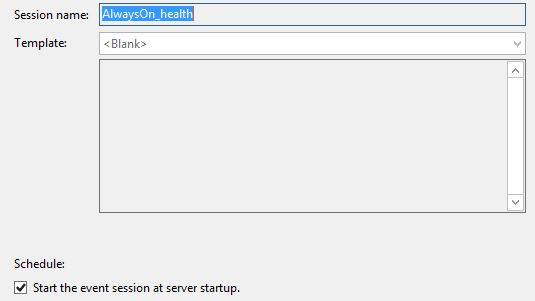
2. Extended Events session "AlwaysOn_health" log
it is auto created when setup alwayson AG,


and by default it does not auto startup, so you can enable it manually


Now, let's use the 2 log files to monitor alwayson AG failover
Enviroment:
>2 nodes  alwayson AG, SQL2012-01(Principle), SQL2012-02(Secondary)
>AG Name: MyAG
>Availability mode: Synchronous commit
>Failover mode:Automatica


1. Manually Failover :   Failover AG from SQL2012-01(01) to SQL2012-02(02)
Please note: Do not use the Failover Cluster Manager to move availability groups to different nodes or to fail over availability groups. The Failover Cluster Manager is not aware of the synchronization status of the availability replicas, and doing so can lead to extended downtime.
ou must use Transact-SQL or SQL Server Management Stud
http://sqlcat.com/sqlcat/b/msdnmirror/archive/2012/03/30/do-not-use-windows-failover-cluster-manager-to-perform-availability-group-failover.aspx

We run the T-sql below on 02
ALTER AVAILABILITY GROUP MyAG failover
go

a) On 01, Open "Merge Extended Event Files"


b)Open "AlwaysOn Health Diagnostics Log" file and Extended Events session "AlwaysOn_health" log


c)Sort result by "timestamp"


you can also click "Choose Columns" to add more column to display.

d)Check the log by failover time.
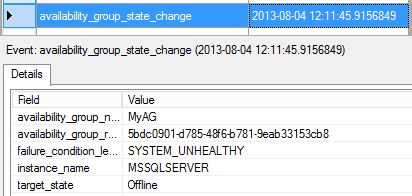
> the first log we find is AVAILABILITY GROUP "offline Pending" State


so AG is taking offline.

>Next, the replica state on 01 is changed from "Primary" to "Resolving"


>Next, AG is offline completely


>finally, replica state is changed from "Resolving" to "Secondary"


e) On 02, use the same way to check the log file
>first, the failover command was issue on 02, begin failover


>Next, replica state is changed from "Secondary" to "Resolving_Pending_Failover"


there are also some "info" message among all events, for instance, it shows the "Diagnostics" is started on new primary 02


>Next, replica state is changed from "Resolving_Pending_Failover" to "Resolving_Normal", then changed to "Primary_Pending"


>Next, AG came online on 02


>Finally, "Alter availability group" command was commit, and replica became to "Primary"


Next, I will try to monitor the AG in other conditions.

Tuesday, July 23, 2013

Gap issue in SQL Server 2012 IDENTITY column

Found a gap issue when using IDENTITY column in SQL Server 2012, every time I restarted sql server service, the current identity number will jump to 1000. here is the repro script

CREATE TABLE MYTEST (ID INT IDENTITY(1,1),
CREATE_DATE datetime);

GO

INSERT INTO MYTEST(CREATE_DATE)
VALUES (GETDATE())
GO 10

DBCC CHECKIDENT ('MYTEST')
GO

the output will be like
Checking identity information: current identity value '10', current column value '10'.
DBCC execution completed. If DBCC printed error messages, contact your system administrator.

then restart sql service, and run

DBCC CHECKIDENT ('MYTEST')
GO

this time we got
Checking identity information: current identity value '1001', current column value '10'.
DBCC execution completed. If DBCC printed error messages, contact your system administrator.


by searching Google, there is a product connection about this issue
https://connect.microsoft.com/SQLServer/feedback/details/739013/alwayson-failover-results-in-reseed-of-identity#details

There are 2 workaround provided.
1. Use trace flag 272


in my testing, the trace flag 272 works good.

2. Use a sequence generator with the NO CACHE setting(http://msdn.microsoft.com/en-us/library/ff878091.aspx).This will cause a log record to be generated for each generated sequence value. Note that the performance of sequence value generation may be impacted by using NO CACHE.

Example:
CREATE SEQUENCE s1 AS INT START WITH 1 NO CACHE;
CREATE TABLE t1 (Id INT PRIMARY KEY DEFAULT NEXT VALUE FOR s1, col INT NOT NULL);