Showing posts with label recovery. Show all posts

Tuesday, October 1, 2013

Enable Instant File Initialization to accelerate database restore

Today my colleague come to me and ask me why her database restore query was hang. She was going to restore a database with 200GB data file and 11GB log file.

She had run the restore command for about 15 minutes, but the restore process is still in 0%, it is not the normal situation she knows. I connected to the server and checked the running query status, the "restore database" command was waiting for the "ASYNC_IO_COMPLETION"


then I checked the disk performance, the database file is still in writing, 110MB/sec


before the database restore start writing data back to the data file, the data file needs to be initialized first. if instant file initialization is enabled, this step will be skipped for data file(only data file), looks like instant file initialization is not enabled on this server.

In order to prove it, I run the script from http://blogs.msdn.com/b/sql_pfe_blog/archive/2009/12/23/how-and-why-to-enable-instant-file-initialization.aspx

DBCC TRACEON(3004,3605,-1)
GO
CREATE DATABASE TestFileZero
GO
EXEC sp_readerrorlog
GO
DROP DATABASE TestFileZero
GO
DBCC TRACEOFF(3004,3605,-1)

in the error log file, I do see the
2013-10-01 18:31:05.56 spid104     Zeroing E:\Program Files\Microsoft SQL Server\MSSQL10_50.MSSQLSERVER\MSSQL\DATA\TestFileZero.mdf from page 0 to 131232 (0x0 to 0x40140000)

so the server is not enabled  instant file initialization. the data file is 200GB, disk write speed is 100-110MB/sec, we get : the file initialization will take about 33 minutes.

I told her just waited for half hour, then you would see the progress. and finally, she told me the restore estimate time started changing after 35 minutes :)

This case proves that enabling Instant File Initialization is really important for sql performance, including database restore.


Tuesday, July 2, 2013

trace flag for backup and restore operation

1. 3004
show the internal backup/restore operation for every step.
ex.
dbcc traceon(3004,3605,-1)
GO

3605 means output the message to errorlog. you can use 3604 to direct the output to client, but it doesn't have the time info which 3605 has. The output looks like below:
LogDate                                 ProcessInfo Text
2013-07-02 16:48:52.280 spid53 RestoreDatabase: Database AdventureWorks
2013-07-02 16:48:52.280 spid53 Opening backup set
2013-07-02 16:48:52.310 spid53 SetTargetRestoreAge: 0
2013-07-02 16:48:52.310 spid53 Restore: Configuration section loaded
2013-07-02 16:48:52.310 spid53 Restore: Backup set is open
2013-07-02 16:48:52.310 spid53 Restore: Planning begins
2013-07-02 16:48:52.320 spid53 Restore: Planning complete
2013-07-02 16:48:52.320 spid53 Restore: BeginRestore (offline) on AdventureWorks
2013-07-02 16:48:52.320 spid53 Restore: Attached database AdventureWorks as DBID=15
2013-07-02 16:48:52.320 spid53 Restore: PreparingContainers
2013-07-02 16:48:52.340 spid53 Zeroing C:\Program Files\Microsoft SQL Server\MSSQL11.SQL2012\MSSQL\DATA\AdventureWorks2012_log.ldf from page 1 to 64000 (0x2000 to 0x1f400000)
2013-07-02 16:48:52.350 spid53 Restore: Containers are ready
2013-07-02 16:48:52.400 spid53 Restore: Restoring backup set
2013-07-02 16:48:52.400 spid53 Restore: Transferring data to AdventureWorks
2013-07-02 16:49:01.640 spid53 Restore: Waiting for log zero on AdventureWorks
2013-07-02 16:49:11.160 spid53 Zeroing completed on C:\Program Files\Microsoft SQL Server\MSSQL11.SQL2012\MSSQL\DATA\AdventureWorks2012_log.ldf
2013-07-02 16:49:11.210 spid53 Restore: LogZero complete
2013-07-02 16:49:11.210 spid53 SetTargetRestoreAge: 0
2013-07-02 16:49:11.320 spid53 FileHandleCache: 0 files opened. CacheSize: 12
2013-07-02 16:49:11.320 spid53 Restore: Data transfer complete on AdventureWorks
2013-07-02 16:49:11.330 spid53 Restore: Backup set restored
2013-07-02 16:49:11.410 spid53 Starting up database 'AdventureWorks'.
2013-07-02 16:49:11.410 spid53 The database 'AdventureWorks' is marked RESTORING and is in a state that does not allow recovery to be run.
2013-07-02 16:49:11.420 spid53 Restore-Redo begins on database AdventureWorks
2013-07-02 16:49:13.390 spid53 RunOfflineRedo logIter.Init(): FirstLsn(PruId: 0): 0x82:0x155:0x45
2013-07-02 16:49:13.390 spid53 RunOfflineRedo logIter.Init(): LastLsn(PruId: 0): 0x82:0x173:0x1
2013-07-02 16:49:13.400 spid53 OfflineRollforward: StopLsn/LastLsn(PruId: 0): 0x82:0x173:0x1
2013-07-02 16:49:13.410 spid53 Rollforward complete on database AdventureWorks
2013-07-02 16:49:13.420 spid53 Restore: Done with fixups
2013-07-02 16:49:13.420 spid53 Restore: Transitioning database to ONLINE
2013-07-02 16:49:13.430 spid53 Restore: Restarting database for ONLINE
2013-07-02 16:49:13.530 spid53 Starting up database 'AdventureWorks'.
2013-07-02 16:49:13.970 spid53 FixupLogTail(progress) zeroing C:\Program Files\Microsoft SQL Server\MSSQL11.SQL2012\MSSQL\DATA\AdventureWorks2012_log.ldf from 0x23ee600 to 0x23f0000.
2013-07-02 16:49:13.970 spid53 Zeroing C:\Program Files\Microsoft SQL Server\MSSQL11.SQL2012\MSSQL\DATA\AdventureWorks2012_log.ldf from page 4600 to 4688 (0x23f0000 to 0x24a0000)
2013-07-02 16:49:13.980 spid53 Zeroing completed on C:\Program Files\Microsoft SQL Server\MSSQL11.SQL2012\MSSQL\DATA\AdventureWorks2012_log.ldf
2013-07-02 16:49:14.080 spid53 PostRestoreContainerFixups: fixups complete
2013-07-02 16:49:14.130 spid53 PostRestoreReplicationFixup for AdventureWorks starts
2013-07-02 16:49:14.810 spid53 PostRestoreReplicationFixup for AdventureWorks complete
2013-07-02 16:49:14.870 spid53 Restore: Database is restarted
2013-07-02 16:49:14.870 Backup Restore is complete on database 'AdventureWorks'.  The database is now available.
2013-07-02 16:49:14.880 spid53 Resuming any halted fulltext crawls
2013-07-02 16:49:15.060 spid53 Restore: Writing history records
2013-07-02 16:49:15.060 Backup Database was restored: Database: AdventureWorks, creation date(time): 2013/07/02(16:33:47), first LSN: 130:341:69, last LSN: 130:371:1, number of dump devices: 1, device information: (FILE=1, TYPE=DISK: {'c:\temp\AdventureWorks.bak'}). Informational message. No user action required.
2013-07-02 16:49:15.060 spid53 Writing backup history records
2013-07-02 16:49:15.080 spid53 Restore: Done with MSDB maintenance
2013-07-02 16:49:15.080 spid53 RestoreDatabase: Finished

The error log shows the it took 9 seconds to restore data and 19 seconds to zero log file. since I have enabled "Instant file initialization", there is zeroing file step for .mdf file. with trace flag 3004 you can see on which step it takes longest time.


2. 3213
show the buffer and maxtransfersize info.
ex.
dbcc traceon(3213,3605,-1)
GO

in errorlog
2013-07-02 17:24:52.070 spid56 Backup/Restore buffer configuration parameters
2013-07-02 17:24:52.070 spid56 Memory limit: 1009MB
2013-07-02 17:24:52.070 spid56 BufferCount:                6
2013-07-02 17:24:52.070 spid56 Sets Of Buffers:            2
2013-07-02 17:24:52.070 spid56 MaxTransferSize:            1024 KB
2013-07-02 17:24:52.070 spid56 Min MaxTransferSize:        64 KB
2013-07-02 17:24:52.070 spid56 Total buffer space:         12 MB
2013-07-02 17:24:52.070 spid56 Tabular data device count:  1
2013-07-02 17:24:52.070 spid56 Fulltext data device count: 0
2013-07-02 17:24:52.070 spid56 Filestream device count:    0
2013-07-02 17:24:52.070 spid56 TXF device count:           0
2013-07-02 17:24:52.070 spid56 Filesystem i/o alignment:   512
2013-07-02 17:24:52.070 spid56 Media Buffer count:            6
2013-07-02 17:24:52.070 spid56 Media Buffer size:          1024KB
2013-07-02 17:24:52.070 spid56 Encode Buffer count:           6
2013-07-02 17:25:00.880 spid56 Starting up database 'sqlnexus'.
2013-07-02 17:25:00.910 spid56 The database 'sqlnexus' is marked RESTORING and is in a state that does not allow recovery to be run.

here we see 6 buffercount, maxtransfersize is 1024.(for buffercount calculation, please refer to http://blogs.msdn.com/b/sqlserverfaq/archive/2010/05/06/incorrect-buffercount-data-transfer-option-can-lead-to-oom-condition.aspx). before you optimize the buffercount and maxtransfersize parameter of backup and restore command, using trace flag 3213 to check the current default value.

3. other trace flag
    a) 3023
        If Trace Flag 3023 is turned on, the CHECKSUM option is automatically enabled for the BACKUP command. You can turn on Trace Flag 3023 to make sure that all backups use the backup CHECKSUM option. If you do this, you do not have to rewrite all the existing backup scripts
       http://support.microsoft.com/kb/2656988

    b) 3226
        No log backup info written into SQL errorlog file

    c) 3001
        No log backup info saved in msdb tables.

    d) 1806
         Turn off "Instant file initialization". maybe only useful when testing.

    e) 3014 and 3216
        log more detail info , ex.
dbcc traceon(3213,3004,3216,3605,-1)
GO

Wednesday, April 3, 2013

Compression Backup with BUFFERCOUNT parameter

If you want to make you backup faster, you can try BUFFERCOUNT parameter with compression backup.

From Book Online description:

BUFFERCOUNT = { buffercount | @buffercount_variable }
Specifies the total number of I/O buffers to be used for the backup operation. You can specify any positive integer; however, large numbers of buffers might cause "out of memory" errors because of inadequate virtual address space in the Sqlservr.exe process.
The total space used by the buffers is determined by: buffercount * maxtransfersize.

Below is my testing result, all backups use compression parameter. the data file is 195GB with 11GB used. by using compression, the backup file is 8.4GB

1. No BUFFERCOUNT parameter
BACKUP DATABASE abc TO DISK = 'c:\temp\abc.bak' WITH COMPRESSION

it completed with 88MB/sec throughput, avg cpu% is 45

2. Add BUFFERCOUNT parameter
BACKUP DATABASE abc TO DISK = 'c:\temp\abc.bak' WITH COMPRESSION, BUFFERCOUNT = 50
it completed with 105MB/sec throughput, avg cpu% is 50

Next I tried BUFFERCOUNT = 100, BUFFERCOUNT = 150 and BUFFERCOUNT = 200

here is the result:

based on the diagram upper, when BUFFERCOUNT = 100, Throughput reach the ceiling, comparing with the first command without BUFFERCOUNT parameter(default), we made the backup process 30% faster.

you can also use multiple backup files to reach the same goal. 

3. Test multiple backup files
my sql server has 2 CPU, so I use 2 backup files:
BACKUP DATABASE abc TO 
DISK = 'c:\temp\abc1.bak',
DISK = 'c:\temp\abc2.bak'
WITH COMPRESSION

it completed with 115MB/sec throughput. avg cpu 60%.

4. Test multiple backup files with BUFFERCOUNT parameter
BACKUP DATABASE abc TO 
DISK = 'c:\temp\abc1.bak',
DISK = 'c:\temp\abc2.bak'
WITH COMPRESSION, BUFFERCOUNT = 50


based on the diagram upper, there is only 5% performance difference between using BUFFERCOUNT and no BUFFERCOUNT.

Although BUFFERCOUNT makes higher CPU %, the backup always runs during off business, so if you can afford the higher CPU% penalty, it is worth to try BUFFERCOUNT. Please test the appropriate BUFFERCOUNT value based on your environment. 


Reference:
http://sqlcat.com/sqlcat/b/technicalnotes/archive/2008/04/21/tuning-the-performance-of-backup-compression-in-sql-server-2008.aspx


Tuesday, August 21, 2012

Restore Database In SQL 2012

In the post below I mentioned a store procedure which  can generate the database restore script based on the msdb history table
http://jamessql.blogspot.com/2012/04/generate-restore-script-automatically.html


Obviously, I had not tried restore in SQL Server 2012 Management Studio at that time. Now we have SQL 2012, which can provide more powerful ways to restore database. let's run the test script first.
==================================
--Create Test database
CREATE DATABASE [Test]
 CONTAINMENT = NONE
 ON  PRIMARY
( NAME = N'Test', FILENAME = N'C:\Program Files\Microsoft SQL Server\MSSQL11.SQL2012\MSSQL\DATA\Test.mdf' , SIZE = 5120KB , FILEGROWTH = 1024KB )
 LOG ON
( NAME = N'Test_log', FILENAME = N'C:\Program Files\Microsoft SQL Server\MSSQL11.SQL2012\MSSQL\DATA\Test_log.ldf' , SIZE = 1024KB , FILEGROWTH = 10%)
GO
ALTER DATABASE [Test] SET RECOVERY FULL
GO
ALTER DATABASE [Test] SET PAGE_VERIFY CHECKSUM 
GO
ALTER DATABASE [Test] SET TARGET_RECOVERY_TIME = 0 SECONDS
GO
SET NOCOUNT ON
GO
USE [Test]
GO
--Create TABLE
create table mytest (a int, b char(10))
go
--Create full backup
Print convert(varchar(101),getdate(),113)
Print '--Created full backup 1'
backup database [Test] to disk = 'C:\temp\backup\Test_full_1.bak'
go
waitfor DELAY '0:01:00'
Print convert(varchar(101),getdate(),113)
Print '--Insert batch - 1'
go
insert into mytest values(1, '1')
go 5
waitfor DELAY '0:01:00'
Print convert(varchar(101),getdate(),113)
Print '----Create diff backup 2'
backup database [Test] to disk = 'C:\temp\backup\Test_diff_2.bak' WITH  DIFFERENTIAL
go
waitfor DELAY '0:01:00'
Print convert(varchar(101),getdate(),113)
Print '--Insert batch - 2'
go
insert into mytest values(2, '2')
go 5
Print convert(varchar(101),getdate(),113)
Print '------Create Log backup 3'
BACKUP LOG  [Test] TO  DISK = N'C:\temp\backup\Test_log_3.trn'
go
waitfor DELAY '0:01:00'
Print convert(varchar(101),getdate(),113)
Print '--Insert batch - 3'
go
insert into mytest values(3, '3')
go 5
Print convert(varchar(101),getdate(),113)
Print '--Created full backup 4'
backup database [Test] to disk = 'C:\temp\backup\Test_full_4.bak'
go
waitfor DELAY '0:01:00'
Print convert(varchar(101),getdate(),113)
Print '--Insert batch - 4'
go
insert into mytest values(4, '4')
go 5


Print convert(varchar(101),getdate(),113)
Print '------Create Log backup 5'
BACKUP LOG  [Test] TO  DISK = N'C:\temp\backup\Test_log_5.trn'
go
waitfor DELAY '0:01:00'
Print convert(varchar(101),getdate(),113)
Print '--Insert batch - 5'
go
insert into mytest values(5, '5')
go 5
Print convert(varchar(101),getdate(),113)
Print '----Create diff backup 6'
backup database [Test] to disk = 'C:\temp\backup\Test_diff_6.bak' WITH  DIFFERENTIAL
go
waitfor DELAY '0:01:00'
Print convert(varchar(101),getdate(),113)
Print '--Insert batch - 6'
go
insert into mytest values(6, '6')
go 5
Print convert(varchar(101),getdate(),113)
Print '------Create Log backup 7'
BACKUP LOG  [Test] TO  DISK = N'C:\temp\backup\Test_log_7.trn'
go
waitfor DELAY '0:01:00'
Print convert(varchar(101),getdate(),113)
Print '--Insert batch - 7'
go
insert into mytest values(7, '7')
go 5
Print convert(varchar(101),getdate(),113)
Print '------Create Log backup 8'
BACKUP LOG  [Test] TO  DISK = N'C:\temp\backup\Test_log_8.trn'
go
waitfor DELAY '0:01:00'
Print convert(varchar(101),getdate(),113)
Print '--Insert batch - 8'
go
insert into mytest values(8, '8')
go 5
SET NOCOUNT OFF
GO
==================================

We created database "Test", inserted data and generated full/diff/log backup. In SSMS,  right click database "Test", and select "Task"->"Restore"->"Database",  the new UI popup

1. At the top of the window, there is message which notice you that a tail-log backup will be taken by default. That's a nice option, if you want to recover database to current point, a tail-log backup of current active database is necessary.
In the "Option" page, you can set the path of the tail-log backup file.

2. You can select restore source from

  • Database: which get the restore information from msdb backup history tables.
  • Device: which get the  restore information from backup file header
3. in "Destination" section, you can set the new database name, and restore database to any time point, which is a really nice feature. here let's change the dbname to "TestDB"

4. According to the source you select, the restore window will auto list all backup files which meet your requirement( which time point you want to restore).
In our sample, it listed last full backup +diff+2 log backup.

5. before you restore, you can click "Verify Backup Media" button to verify if backup file is corrupted. That's really helpful when you try to restore many files, but if the size of the files are big, it will take long time to verify.

6. In Files page, here is a enhancement, you can change the location of all files, it is convenient if you have multi-files.

7. In "options" page, we can set the path of tail-log backup file. since we restore test database to a new database TestDB, so we unchecked the "Leave source database in the restoring state" option.

Click OK, the new database testdb will be restored, however, you will not find data batch 8 in the mytest table, because we didn't restore trail-log backup.

Next, let's try restore to time point.
1. Click the "TimeLine..." button to open the Backup timeline window. here you can set the specific date and time.


2. Click OK and return to the restore window, in the restore plan section, it will list all backup files auto. that's really nice.

Last, let's try to restore database with the backup files directly.

1. Drop the Test Database with all backup history in msdb

EXEC msdb.dbo.sp_delete_database_backuphistory @database_name = N'Test'
GO
USE [master]
GO
ALTER DATABASE [Test] SET  SINGLE_USER WITH ROLLBACK IMMEDIATE
GO
USE [master]
GO
DROP DATABASE [Test]
GO


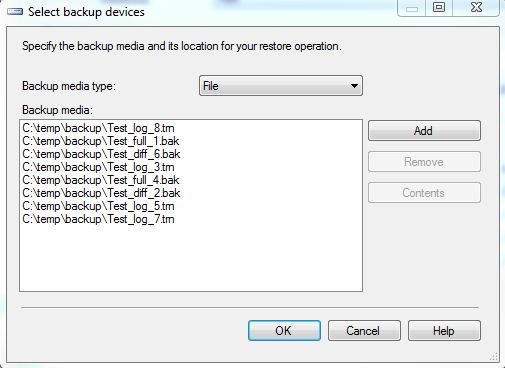
2. Click "Restore Databases" to open the restore db window, and select "Device" in Source section.

3. add all backup files, click ok

4. in the restore plan section, it will list the restore plan with the files we need.
if any backup file is missing, the tool will report error that the restore chain is broken.
I think if the file name could be listed in the restore plan as well, that will be great! without the file name, I can not know which files I will use to restore. the only way I can use is script the restore action, and check the script.


Except for improvement of the restore database, there is new UI for page restore as well. I like these improvement for the db restore :)


Saturday, July 7, 2012

Backup Master Database

The story came from a question someone asked me.

Does Master database support full recovery mode?

As I remembered, by default, Master database is in "Simple" recovery mode. I never try to put it into Full recovery mode because master database is not updated frequently, and it is very small.  I only use daily backup for master database.

Here is the database properties page of master database on SQL Server 2008 R2.

So we can change it recovery mode to "FULL", but does it really work?  I tried to backup it by SSMS

Well, I can only select "FULL" backup type. How about run backup command?

BACKUP DATABASE [Master] TO  DISK = N'C:\master.dif' WITH  DIFFERENTIAL
GO
I got error:

Msg 3024, Level 16, State 0, Line 1
You can only perform a full backup of the master database. Use BACKUP DATABASE to back up the entire master database.
Msg 3013, Level 16, State 1, Line 1
BACKUP DATABASE is terminating abnormally.

In SQL BOL, http://msdn.microsoft.com/en-us/library/ms365937(v=sql.105).aspx, for master database:
For backwards compatibility with earlier versions of Microsoft SQL Server, the recovery model of master can be set to FULL or BULK_LOGGED. However, BACKUP LOG is not supported for master. Therefore, even if the recovery model of master is changed to full or bulk-logged, the database continues to operate as if it were using the simple recovery model.

Forget mentioning that
Not only transaction log backup, but also differential backup can not be run on master database. Why? because you can not restore master database with norecovery mode, without norecovery, why we need to keep differential backup and log backup? :)

Master database contains the data blow
1. Login account info
2. System parameter (sp_configure)
3. Database info
4. Server objects, for instance the linked server, system trigger.
5. Other server level security info

So except for the regular backup, you need to take a full database backup after you change the data upper. However, if you maintain the system for customer, you will not be notified when customer change the master database. If the server is corrupted, as there is no differential and log backup for master database, you can not restore the database to point of time,  there will be data lost.

I was thinking if there is an appropriate way to backup the master database automatically after any change.The first thing is we need to capture the change event .

1. Using system trigger monitor the event.
    DDL trigger can monitor the server level DDL, using the script below can list all the DDL trigger hierarchically
================================
;WITH EVENTCATALOG([TYPE],[TYPE_NAME], [PARENT_NAME], LEVEL)
AS
(
 SELECT [TYPE]
   ,[TYPE_NAME]
   ,[TYPE_NAME] AS PARENT_NAME
   ,0 AS LEVEL
 FROM SYS.trigger_event_types
 WHERE TYPE=10002 OR TYPE=296

 UNION ALL

 SELECT
   TET.TYPE
   ,TET.TYPE_NAME
   ,EC.TYPE_NAME AS PARENT_NAME
   ,EC.LEVEL+1 AS LEVEL
 FROM SYS.trigger_event_types TET
 INNER JOIN EVENTCATALOG EC ON TET.parent_type=EC.TYPE
)
SELECT [TYPE],[TYPE_NAME], [PARENT_NAME], LEVEL
FROM EVENTCATALOG ORDER BY LEVEL, TYPE_NAME
================================

So we just need to create ddl trigger for the root event ALTER_SERVER_CONFIGURATION and DDL_SERVER_LEVEL_EVENTS.  However, event ALTER_SERVER_CONFIGURATION cannot be monitored, fortunately, we don't need to run "ALTER SERVER CONFIGURATION" or SP_CONFIGURE frequently, so monitor event DDL_SERVER_LEVEL_EVENTS is enough.  here is the sample code
================================
SET ANSI_NULLS ON
GO
SET QUOTED_IDENTIFIER ON
GO
CREATE TRIGGER [SystemTrigger] ON ALL SERVER
FOR DDL_SERVER_LEVEL_EVENTS
AS
DECLARE @data XML;
DECLARE @eventtype sysname;
DECLARE @PostTime sysname;
DECLARE @LoginName sysname;
DECLARE @UserName sysname;
DECLARE @object sysname;
DECLARE @tsql sysname;
DECLARE @message varchar(max);
DECLARE @path varchar(200);
SET @data = EVENTDATA();
SET @eventType = @data.value('(/EVENT_INSTANCE/EventType)[1]', 'sysname')
SET @PostTime = @data.value('(/EVENT_INSTANCE/PostTime)[1]','sysname')
SET @LoginName = @data.value('(/EVENT_INSTANCE/LoginName)[1]','sysname')
SET @UserName = @data.value('(/EVENT_INSTANCE/UserName)[1]','sysname')
SET @object = @data.value('(/EVENT_INSTANCE/DatabaseName)[1]','sysname')
SET @tsql=EVENTDATA().value('(/EVENT_INSTANCE/TSQLCommand/CommandText)[1]','nvarchar(max)')
SET @message=' On server '+ @@servername+ ' login name '+ isnull(@LoginName,'UNKNOWN')+',user '
    +ISNULL(@UserName,'UNKNOWN')+' run the command '+ isnull(@eventType, 'Unknown Database Operation')
    + ' on database '+ISNULL(@object,'UNKNOWN')+' at '+ISNULL(@PostTime,'UNKNOWN') + '. '
SET @message=@message + 'SQL Command is:'
SET @message=@message + isnull(@tsql,'')

raiserror (@message, 0, 0) with log

GO
SET ANSI_NULLS OFF
GO
SET QUOTED_IDENTIFIER OFF
GO
ENABLE TRIGGER [SystemTrigger] ON ALL SERVER
================================

if we run any server level DDL, the command will be logged into sql server errorlog file.  Here I dropped a database and detached another one, then in the sql server errorlog, I can find message:


2. Backup master database
In the first step, we capture the system level event, now we need to backup the master database automatically. It is a challenge, because  you can not backup database in the DDL trigger. we need to find out another solutions:
             a) Call sql job in the DDL Trigger
                 well, you can create a sql job which backup the master database only without schedule , then start the job from the DDL trigger.
================================
SET ANSI_NULLS ON
GO
SET QUOTED_IDENTIFIER ON
GO
ALTER TRIGGER [SystemTrigger] ON ALL SERVER
FOR DDL_SERVER_LEVEL_EVENTS
AS
DECLARE @data XML;
DECLARE @eventtype sysname;
DECLARE @PostTime sysname;
DECLARE @LoginName sysname;
DECLARE @UserName sysname;
DECLARE @object sysname;
DECLARE @tsql sysname;
DECLARE @message varchar(max);
DECLARE @path varchar(200);
SET @data = EVENTDATA();
SET @eventType = @data.value('(/EVENT_INSTANCE/EventType)[1]', 'sysname')
SET @PostTime = @data.value('(/EVENT_INSTANCE/PostTime)[1]','sysname')
SET @LoginName = @data.value('(/EVENT_INSTANCE/LoginName)[1]','sysname')
SET @UserName = @data.value('(/EVENT_INSTANCE/UserName)[1]','sysname')
SET @object = @data.value('(/EVENT_INSTANCE/DatabaseName)[1]','sysname')
SET @tsql=EVENTDATA().value('(/EVENT_INSTANCE/TSQLCommand/CommandText)[1]','nvarchar(max)')
SET @message=' On server '+ @@servername+ ' login name '+ isnull(@LoginName,'UNKNOWN')+',user '
    +ISNULL(@UserName,'UNKNOWN')+' run the command '+ isnull(@eventType, 'Unknown Database Operation')
    + ' on database '+ISNULL(@object,'UNKNOWN')+' at '+ISNULL(@PostTime,'UNKNOWN') + '. '
SET @message=@message + 'SQL Command is:'
SET @message=@message + isnull(@tsql,'')

WAITFOR DELAY '00:00:02'
EXEC msdb..sp_start_job 'backupmaster'

raiserror (@message, 0, 0) with log;
GO
SET ANSI_NULLS OFF
GO
SET QUOTED_IDENTIFIER OFF
GO
ENABLE TRIGGER [SystemTrigger] ON ALL SERVER
================================
The solution is not perfect, because
  • The ddl trigger calls sql job to backup the master db, if the job is running, call will be failed, and you will get error message
  • If sql agent is not running, the backup doesn't work, and ddl trigger will report error
  • Becareful when you use SSMS, for instance, if you create a database from SSMS, the "CREATE_DATABASE" and "ALERT_DATABASE" event will be triggered many times, and the DDL trigger will be run many times as well. You'd better replace the "DDL_SERVER_LEVEL_EVENTS" in the trigger with a smaller scope trigger, like create the trigger only for event "CREATE_DATABASE".
  • When calling sql job to backup the master db, it is possible that the trigger hasn't finished but sql job has been run. So it is possible the backup of master db doesn't have the new changes......although it doesn't happen during my testing.
             b) backup master database with sql job runing priodically
            By this way, you even don't need DDL Trigger, just create a sql job to backup the master database periodically, maybe 1 minute or 5 minutes. The problem is you will have many backup files for master databases, and backing up master database frequently might have a little bit performance impact. So we can setup the flag in the DDL trigger, have the sql job check the flag, if it is set, then backup the master database.

This solution is also not perfect:
  • More code and more program
  • When set the flag, it is possible to cause blocking issue.
  • Larger time interval between the change and the master backup. 
So we can see without transaction log backup, how difficult it is to implement the disaster recovery.

Friday, May 25, 2012

Backup duration statistics

Here is a simple query which can list backup duration statistics for all database, including the max, min, avg of the backup duration.  you can estimate the backup duration by this query when you plan your backup job


 SELECT
  DBNAME,
  backup_type,
  MAX(sizeMB) as MaxBackupFileSizeMB,
  Max(duration) as MaxDurationSEC,
  MAX(speedMBSEC) as MaxSpeedMBperSEC,
  MIN(sizeMB) as MinBackupFileSizeMB,
  MIN(duration) as MinDurationSEC,
  MIN(speedMBSEC) as MinSpeedMBperSEC,
  AVG(sizeMB) as AvgBackupFileSizeMB,
  AVG(duration) as AvgDurationSEC,
  AVG(speedMBSEC) as AvgSpeedMBperSEC
 FROM
  (
   SELECT
    backup_set_id,
    DBNAME,
    backup_type,
    SUM(sizeMB) sizeMB,
    MAX(duration) duration,
    SUM(sizeMB)/MAX(duration) speedMBSEC
   FROM (
    SELECT
       bs.backup_set_id,
       bs.database_name AS DBNAME,
       bs.backup_start_date, 
       bs.backup_finish_date,
       DATEDIFF(ss, bs.backup_start_date, bs.backup_finish_date) duration,
       CASE bs.type 
        WHEN 'D' THEN 'Full' 
        WHEN 'L' THEN 'Log' 
        WHEN 'I' THEN 'Diff'
       END AS backup_type, 
       bs.backup_size/1048576 sizeMB
    FROM   msdb.dbo.backupmediafamily  bmf
       INNER JOIN msdb.dbo.backupset bs ON bmf.media_set_id = bs.media_set_id 
    Where DATEDIFF(ss, bs.backup_start_date, bs.backup_finish_date) >= 1
    ) a
   GROUP BY
    backup_set_id,
    DBNAME,
    backup_type
   
  ) b
 GROUP BY  DBNAME,backup_type
 order by DBNAME asc, backup_type asc, AvgDurationSEC desc

Saturday, May 12, 2012

Use Powershell script to verify backup files

Before restoring backup, we always verify the backup file first, and run the 3 command below:

1. RESTORE HEADERONLY
    Returns a result set containing all the backup header information for all backup sets on a particular backup device.

2. RESTORE FILELISTONLY
    Returns a result set containing a list of the database and log files contained in the backup set.

3. RESTORE VERIFYONLY
    Verifies the backup but does not restore it, and checks to see that the backup set is complete and the entire backup is readable

sometimes we also want to keep that info for refererence later. If there is only one backup file, it is easy to handle. you can verify it from SSMS, or by sqlcmd. But if there are many backup files, it will be time consuming to verify them.

Here is a little Powershell Script which can help you verify the backup files, and export the results to file. For instance:
 in the folder below, we have 2 backup device, every backup device has 3 backup files


1. Run the powershell script first
2. Run verifyBackup following by the folder path, here is the sample:
verifyBackup "C:\Program Files\Microsoft SQL Server\MSSQL10_50.MSSQLSERVER\MSSQL\Backup\AWD"

then you will get the output like:

you can also get the detail report for each backup set in the same folder

some notes:
1. the current version only works on 1 backup set per device.
2. there are 3 parameters for verifyBackup function
         a) $backupPath: the bakcup file path
         b) $tempPath: the temp file path for "restore verifyonly". By default , it is same as $backupPath
         c) $sqlserver: by default, it use localhost as sql instance name

Powershell script:
##################################################################################
$global:backupsets = New-Object System.Collections.Hashtable
$global:restoreHeaderOnly = New-Object System.Collections.Hashtable
$global:restoreFilelistOnly = New-Object System.Collections.Hashtable
$global:restoreScripts= New-Object System.Collections.Hashtable
function global:run-sql (
 [String]$sql,
 [String]$server,
 [String]$database="master"
)
{
 $connectionString = "Server="+$server+";Database="+$database+";Trusted_Connection=yes"
 $conn = new-object System.Data.SqlClient.SqlConnection $connectionString
 $conn.Open()
 $comm = $conn.CreateCommand()
 $comm.CommandText = $sql
 $reader = $comm.ExecuteReader()
 while($reader.Read())
 {
  $row = new-object PSObject
  for($i = 0; $i -lt $reader.FieldCount; ++$i)
  {
   add-member -inputObject $row -memberType NoteProperty -name $reader.GetName($i) -value $reader.GetValue($i)
  }
  write-output $row
 }
 $reader.Close()
 $conn.Close()
}
function global:verifyBackup(
 [String]$backupPath,
 [String]$tempPath=$backupPath,
 [String]$sqlserver="localhost"
)
{
 $global:backupsets = New-Object System.Collections.Hashtable
 $global:restoreHeaderOnly = New-Object System.Collections.Hashtable
 $global:restoreFilelistOnly = New-Object System.Collections.Hashtable
 $global:restoreVerifyOnly = New-Object System.Collections.Hashtable
 $files=gci -Path $backupPath | where{$_.Extension -match "bak|trn"} | select name | sort-object name
 #Write-Output $files


 foreach($file in $files) {
  $filepath=$backupPath+"\" + $file.Name
  $sqlcmd="restore headeronly from disk='" + $filepath+"'"
  $headinfos=global:run-sql $sqlcmd $sqlserver

  foreach ($headinfo in $headinfos)
  {
   if ($headinfo){
    $key=$headinfo.DatabaseName #+"."+$headinfo.CheckpointLSN
    #Write-Output $key
    if ($global:backupsets.ContainsKey($key))
    {
     $global:backupsets.Item($key).add($filepath)
    }
    else
    {
     $temp=New-Object System.Collections.ArrayList
     $temp.add($filepath)
     $global:backupsets.Add($key, $temp)
    }
   }
  }
 }

 # run restore headeronly
 foreach ($fileKey in $global:backupsets.keys)

 {
  $sqlcmd="restore headeronly from "
  $backupfiles=$global:backupsets.Item($fileKey)
  foreach ($backupfile in $backupfiles)
  {
   $sqlcmd=$sqlcmd+"disk='"+$backupfile+"',"
  }
  if ($sqlcmd.EndsWith(","))
  {
   $sqlcmd=$sqlcmd.TrimEnd(",")
  }


  $restoreInfo=global:run-sql $sqlcmd $sqlserver
  $global:restoreHeaderOnly.Add($fileKey, $restoreInfo)

  $csvfile=$backupPath+"\"+$fileKey+"_headeronly.csv"
  $restoreInfo | Export-Csv -Path $csvfile

 }

 #run restore filelistonly
 foreach ($fileKey in $global:backupsets.keys)
 {
  $sqlcmd="RESTORE FILELISTONLY from "
  $backupfiles=$global:backupsets.Item($fileKey)
  foreach ($backupfile in $backupfiles)
  {
   $sqlcmd=$sqlcmd+"disk='"+$backupfile+"',"
  }
  if ($sqlcmd.EndsWith(","))
  {
   $sqlcmd=$sqlcmd.TrimEnd(",")
  }


  $restoreInfo=global:run-sql $sqlcmd $sqlserver
  $global:restoreFilelistOnly.Add($fileKey, $restoreInfo)

  $csvfile=$backupPath+"\"+$fileKey+"_filelistonly.csv"
  $restoreInfo | Export-Csv -Path $csvfile

 }

 #run restore verifyonly
 foreach ($fileKey in $global:backupsets.keys)
 {
  $sqlcmd="RESTORE VERIFYONLY from "
  $backupfiles=$global:backupsets.Item($fileKey)
  foreach ($backupfile in $backupfiles)
  {
   $sqlcmd=$sqlcmd+"disk='"+$backupfile+"',"
  }

  if ($sqlcmd.EndsWith(","))
  {
   $sqlcmd=$sqlcmd.TrimEnd(",")
  }

  $sqlcmd=$sqlcmd + " with "

  $fileList=$global:restoreFilelistOnly.Item($fileKey)

  foreach ($file in $fileList)
  {
   $logcalName=$file.LogicalName
   $physicalName=$file.PhysicalName | split-path -leaf
   $sqlcmd=$sqlcmd+ " move '"+$logcalName + "' to '" + $tempPath+"\"+ $physicalName+"',"
 
  }

  if ($sqlcmd.EndsWith(","))
  {
   $sqlcmd=$sqlcmd.TrimEnd(",")
  }
  $csvfile=$backupPath+"\"+$fileKey+"_verifyonly.txt"
  $cmd="sqlcmd -E -S " + $sqlserver + " -Q `" " + $sqlcmd + " `"  -o `""+ $csvfile+"`""
  invoke-expression $cmd
  $msg="Verify backup of database [" +$fileKey+ "] is done: `n"
  $msg+= gc $csvfile
  Write-Output $msg

  Add-Content $csvfile "`n"
  Add-Content $csvfile "$sqlcmd"
 }


}

Wednesday, May 9, 2012

Backup database in CMS

Sometime you know the database name which you want to backup, but you don't know which server it is on. Normally we will
1. run query on CMS to find out which server the database is on
2. then connect to the server and run backup query.

If you backup only a database, it might be easy to do the steps upper, but if you need to backup dozen of databases, it would take you some time.

Here is a script you can use to backup databases from CMS directly, we don't need to know which server it is on:
1. connect to CMS, Open the query below
2. edit the @type and dbname session with what you need, then run it

the script can create backup for all database you input, and create backup file under last bakcup file path or default backup path.

/******************************************************************
* Backup database in database farm, you can run it on the central management server
* 1. edit the script with the database list which you want to bakcup,
* 2. edit the @type with value "Full" or "Diff"
* the backup file will be created in the latest backup path. if the database don
* Type:  T-SQL
* Version:     1.00.0000
*
* Author: James Xu
* blog: http://jamessql.blogspot.com/
*
*
'*****************************/
DECLARE @dbName varchar(200)
DECLARE @type varchar(200)
DECLARE @path varchar(200)
DECLARE @sql varchar(max)
DECLARE @curtime varchar(30)
DECLARE @rc int
--edit the backup type : 'Full' - full backup, 'Diff' - Differential backup
SET @type='Full'
--SET @type='Diff'
--edit the db name here and add more as you need
DECLARE DB_cursor CURSOR FOR
SELECT 'RS' AS DBNAME
UNION
SELECT 'aaaaa' AS DBNAME
UNION
SELECT 'DataCollector' AS DBNAME
--edit the db name here and add more as you need
SET @curtime=replace(replace(replace(convert(varchar(30), GETDATE(), 120), '-', ''), ' ', ''), ':','')
OPEN DB_cursor;
FETCH NEXT FROM DB_cursor
INTO @dbName
WHILE (@@FETCH_STATUS = 0)
BEGIN
      if (exists(select * from sys.databases where name=@dbName))
      begin
            select top 1 @path=reverse(substring(reverse(physical_device_name),charindex('\',reverse(physical_device_name)),len(physical_device_name)))
            from  msdb..backupmediafamily bmf inner join msdb..backupset bs on bmf.media_set_id=bs.media_set_id
            inner join sys.databases db on bs.database_name=db.name
            inner join sys.database_mirroring dbm on db.database_id=dbm.database_id
            where bs.database_name =@dbName and bs.type='D' and isnull(dbm.mirroring_role,1) = 1  order by bs.backup_finish_date desc
           
            if (@path is null)
            begin
    exec @rc = master.dbo.xp_instance_regread   N'HKEY_LOCAL_MACHINE', N'Software\Microsoft\MSSQLServer\MSSQLServer',N'BackupDirectory', @path output
            end
           
            if (@path is not null)
            Begin
                  set @path=@path+@dbName+'_'+@type+'_'+@curtime+'.bak'
                  set @sql='BACKUP DATABASE ['+ @dbName +'] TO DISK='''
                  if (@type='Full')
     set @sql=@sql+@path+''' WITH NOFORMAT, NOINIT,  NAME = N'''+@dbname+'-Full Database Backup'', SKIP, NOREWIND, NOUNLOAD,  STATS = 10'
      else
     set @sql=@sql+@path+''' WITH DIFFERENTIAL, NOFORMAT, NOINIT,  NAME = N'''+@dbname+'-Differential Database Backup'', SKIP, NOREWIND, NOUNLOAD,  STATS = 10'
                 
                  EXEC(@sql)
                  PRINT 'DONE - ' + @SQL
            end
            else
            begin
    PRINT 'There is no existing backup for database ' + @dbname
            end
                 
      end
      FETCH NEXT FROM DB_cursor
      INTO @dbName
END
CLOSE DB_cursor;
DEALLOCATE DB_cursor;

Monday, April 30, 2012

Generate restore script automatically by backup history table

I wrote a store procedure which could generate restore script automatically by backup history table. it can help you select a best restore solution base on the backup history table.

For instance,  if you backup the database as the sequence below
ID backup_start_date backup_type
1 2012-04-30 18:28:43.000 Full
2 2012-04-30 18:29:22.000 Log
3 2012-04-30 18:29:52.000 Full
4 2012-04-30 18:30:28.000 Full
5 2012-04-30 18:33:11.000 Diff
6 2012-04-30 18:37:18.000 Diff
7 2012-04-30 18:39:26.000 Log
8 2012-04-30 18:40:58.000 Full
9 2012-04-30 18:43:21.000 Full
10 2012-04-30 18:43:56.000 Full
11 2012-04-30 18:44:10.000 Full
12 2012-04-30 18:48:50.000 Log
13 2012-04-30 18:50:53.000 Log

let's say you want to generate restore script which can restore the database to  '2012-04-30 18:34:00',
it will automatically generate restore script by using the backup file below
ID backup_start_date backup_type
4 2012-04-30 18:30:28.000 Full
5 2012-04-30 18:33:11.000 Diff
7 2012-04-30 18:39:26.000 Log

if you want to restore to '2012-04-30 18:44:00', it will generate script by backup file
10 2012-04-30 18:43:56.000 Full
12 2012-04-30 18:48:50.000 Log

The store procedure can also check if the backup file is existed.
you can also generate restore script for any point, let me know your feedback . thanks

---------------------------------------------------------------------------------------------------------------
USE [msdb]
GO
IF  EXISTS (SELECT * FROM sys.objects WHERE object_id = OBJECT_ID(N'[dbo].[sp_RestoreDBbyHistory]') AND type in (N'P', N'PC'))
DROP PROCEDURE [dbo].[sp_RestoreDBbyHistory]
GO
USE [msdb]
GO
CREATE PROCEDURE [dbo].[sp_RestoreDBbyHistory] (
 @SourceDB  varchar(200),
 @DestinationDB varchar(200)   =NULL,
 @RestoreToTime datetime    =NULL,   --'yyyy-mm-dd hh:mi:ss', ie. '2012-04-27 22:19:20'
 @RecoveryMode varchar(10)    ='Recovery',  --'Recovery' or 'Norecovery'
 @ListMode   varchar(10)   ='OnlyValid'   --'All' or 'OnlyValid'
 )
AS
/*********************************************************************************************
Generate database restore script by backup history, it can
1. give out the restore script and sequence
 @ListMode='All' :   lists all possible restore scripts before @RestoreToTime
 @ListMode='OnlyValid' :  gives out a best valid restore way with mininum script.
2. check if the backup file existed

blog: http://jamessql.blogspot.com/
Example:
1. Generate restore script for database RS
EXEC sp_RestoreDBbyHistory @SourceDB='RS'
2. Generate all possible restore script for database RS, restore it as name 'RS_restored' to '2012-04-30 14:13:30.000' and with norecovery
[sp_RestoreDBbyHistory]
@SourceDB='RS'
,@DestinationDB='RS_restored'
,@RestoreToTime ='2012-04-30 14:13:30.000'
,@RecoveryMode ='Norecovery'
,@ListMode='All'
Pleaes test it by yourself first.
*********************************************************************************************/
BEGIN

 DECLARE @Exists int
 DECLARE @File_Exists varchar(30)
 DECLARE @backup_start_date datetime
 DECLARE @backup_finish_date datetime
 DECLARE @first_lsn numeric(25,0)
 DECLARE @last_lsn numeric(25,0)
 DECLARE @position int
 DECLARE @backup_type varchar(20)
 DECLARE @backup_size numeric(20,0)
 DECLARE @physical_device_name varchar(500)
 DECLARE @backupset_name varchar(500)
 DECLARE @differential_base_lsn numeric(25,0)
 DECLARE @database_backup_lsn numeric(25,0)


 DECLARE @restore_command varchar(max)
 DECLARE @lastfile bit
 DECLARE @stopat varchar(50)
 DECLARE @MOVETO VARCHAR(MAX)
 DECLARE @MOVETO_temp VARCHAR(MAX)
 DECLARE @first_backup_set_id int

 IF (@SourceDB is NULL)
 BEGIN
  PRINT 'Please input the @SourceDB name!'
  RETURN
 END

 IF (@DestinationDB is NULL)
  SET @DestinationDB=@SourceDB

 if (@RestoreToTime is NULL)
 BEGIN
  SET @stopat=''
  SET @RestoreToTime=GETDATE()
 END
 else
  SET @stopat=', STOPAT = '''+CONVERT(varchar(50), @RestoreToTime)+''''

 IF (@RecoveryMode NOT IN ('Recovery', 'Norecovery'))
 BEGIN
  PRINT 'Please set parameter @RecoveryMode with value ''Recovery'' or ''Norecovery'''
  RETURN
 END

 IF (@ListMode NOT IN ('All', 'OnlyValid'))
 BEGIN
  PRINT 'Please set parameter @@Mode with value ''All'' or ''OnlyValid'''
  RETURN
 END

 SET @lastfile=0
 SET @MOVETO=''

 --FIND the last valid full backup
 SELECT TOP 1 @first_backup_set_id=backup_set_id
 FROM MSDB..backupset bs
 WHERE bs.type='D'
 AND bs.backup_start_date<=@RestoreToTime
 AND bs.database_name=@SourceDB
 ORDER BY bs.backup_start_date DESC

 IF (@first_backup_set_id IS NULL)
 BEGIN
  SELECT @first_backup_set_id=MIN(bs.backup_set_id)
  FROM MSDB..backupset bs
  WHERE bs.database_name=@SourceDB AND bs.backup_start_date<=@RestoreToTime
 
  IF (@first_backup_set_id IS NULL)
  BEGIN
   PRINT 'There is no any valid backup!!!'
   return
  END
  ELSE
   PRINT 'There is no valid full backup!!!'
  
 END
 ELSE
 BEGIN
  SELECT @MOVETO=@MOVETO+'MOVE N''' +bf.logical_name+''' TO N'''+
  REVERSE(RIGHT(REVERSE(bf.physical_name),(LEN(bf.physical_name)-
  CHARINDEX('\', REVERSE(bf.physical_name),1))+1))+
  CASE
   WHEN bf.file_number = 1 THEN @DestinationDB+'_data.mdf'
   WHEN (bf.file_number <> 1) and (bf.file_type = 'L') THEN @DestinationDB+'_log'+CONVERT(varchar(3),bf.file_number)+'.ldf'
   WHEN (bf.file_number <> 1) and (bf.file_type = 'D') THEN @DestinationDB+'_data'+CONVERT(varchar(3),bf.file_number)+'.ndf'
   ELSE @DestinationDB+'_'+CONVERT(varchar(3),bf.file_number)+'.ndf'
  END +
  ''','
  FROM msdb..backupfile bf LEFT JOIN msdb..backupset bs on bf.backup_set_id=bs.backup_set_id
  where bf.backup_set_id=@first_backup_set_id
  SET @MOVETO_temp=@MOVETO
 END

 CREATE TABLE #RestoreCommand(
  ID int NOT NULL IDENTITY (1, 1),
  backup_start_date datetime,
  backup_finish_date datetime,
  database_backup_lsn numeric(25,0),
  differential_base_lsn numeric(25,0),
  first_lsn numeric(25,0),
  last_lsn numeric(25,0),
  postion int,
  backup_type varchar(20),
  backup_size numeric(20,0),
  physical_device_name varchar(500) ,
  backupset_name varchar(500),
  restore_command varchar(max),
  fileExist varchar(20)
 )
 IF (@ListMode='All')
  SET @first_backup_set_id=1
 DECLARE backup_cursor CURSOR FOR
 SELECT
    bs.backup_start_date, 
    bs.backup_finish_date,
    bs.database_backup_lsn,
    bs.differential_base_lsn,
    bs.first_lsn,
    bs.last_lsn,
    position,
    CASE bs.type 
     WHEN 'D' THEN 'Full' 
     WHEN 'L' THEN 'Log' 
     WHEN 'I' THEN 'Diff'
    END AS backup_type, 
    bs.backup_size,
    bmf.physical_device_name,  
    bs.name AS backupset_name
 FROM   msdb.dbo.backupmediafamily  bmf
    INNER JOIN msdb.dbo.backupset bs ON bmf.media_set_id = bs.media_set_id 
 WHERE bs.database_name=@SourceDB
 AND bs.backup_set_id>=@first_backup_set_id
 ORDER BY 
    bs.backup_start_date

 OPEN backup_cursor;
 FETCH NEXT FROM backup_cursor
 INTO @backup_start_date,@backup_finish_date,@database_backup_lsn,@differential_base_lsn,@first_lsn, @last_lsn,@position, @backup_type,@backup_size,@physical_device_name, @backupset_name

 WHILE ((@@FETCH_STATUS = 0) and (@lastfile <>1))
 BEGIN
  --check if file exist
  EXEC Master.dbo.xp_fileexist @physical_device_name, @Exists OUT
  IF  (@Exists= 1)
   SET @File_Exists= 'File Found'
  ELSE
   SET @File_Exists= 'File Not Found'
  
  IF (@backup_start_date<=@RestoreToTime)
  BEGIN
   --if this diff backup, then remove all log backup before it.
   IF ((@backup_type='Diff') and (@ListMode='OnlyValid'))
    DELETE FROM #RestoreCommand
    WHERE backup_type IN ('Log', 'Diff')
  
   IF @backup_type='Full'
   BEGIN
    SET @MOVETO_temp=@MOVETO
    IF (@ListMode='OnlyValid')
     DELETE FROM #RestoreCommand
   END
   ELSE
    SET @MOVETO_temp=''
   SET @restore_command=
    CASE  
     WHEN @backup_type in ('Full','Diff') THEN 'RESTORE DATABASE [' + @DestinationDB + '] FROM  DISK = N'''+ @physical_device_name +''' WITH  FILE = '+convert(varchar(3),@position)+','+@MOVETO_temp+'NORECOVERY, NOUNLOAD,  STATS = 10'
     WHEN @backup_type = 'Log' THEN 'RESTORE LOG [' + @DestinationDB + '] FROM  DISK = N'''+ @physical_device_name +''' WITH  FILE = '+convert(varchar(3),@position)+','+@MOVETO_temp+'NORECOVERY, NOUNLOAD, STATS = 10'
    END
  
   INSERT INTO #RestoreCommand (
    backup_start_date,
    backup_finish_date,
    database_backup_lsn ,
    differential_base_lsn,
    first_lsn,
    last_lsn,
    postion,
    backup_type,
    backup_size,
    physical_device_name ,
    backupset_name,
    restore_command,
    fileExist)
   VALUES
   (
    @backup_start_date,
    @backup_finish_date,
    @database_backup_lsn ,
    @differential_base_lsn,
    @first_lsn,
    @last_lsn,
    @position,
    @backup_type,
    @backup_size,
    @physical_device_name,
    @backupset_name,
    @restore_command,
    @File_Exists
   )
  END
  ELSE
   IF (@backup_type='Log')
   BEGIN
    SET @lastfile=1
    SET @restore_command='RESTORE LOG [' + @DestinationDB + '] FROM  DISK = N'''+ @physical_device_name +''' WITH  FILE = '+convert(varchar(3),@position)+',NORECOVERY, NOUNLOAD, STATS = 10'
    SET @restore_command=REPLACE(@restore_command, 'NORECOVERY','RECOVERY')+@stopat
    INSERT INTO #RestoreCommand (
     backup_start_date,
     backup_finish_date,
     database_backup_lsn ,
     differential_base_lsn,
     first_lsn,
     last_lsn,
     postion,
     backup_type,
     backup_size,
     physical_device_name ,
     backupset_name,
     restore_command,
     fileExist)
    VALUES
    (
     @backup_start_date,
     @backup_finish_date,
     @database_backup_lsn ,
     @differential_base_lsn,
     @first_lsn,
     @last_lsn,
     @position,
     @backup_type,
     @backup_size,
     @physical_device_name,
     @backupset_name,
     @restore_command,
     @File_Exists
    )
   END
  FETCH NEXT FROM backup_cursor
  INTO @backup_start_date,@backup_finish_date,@database_backup_lsn,@differential_base_lsn,@first_lsn, @last_lsn,@position, @backup_type,@backup_size,@physical_device_name, @backupset_name
 END
 CLOSE backup_cursor;
 DEALLOCATE backup_cursor;

 IF (@lastfile<>1)
  INSERT INTO #RestoreCommand (
   restore_command)
  VALUES
   (
   'You need to back up the Tail of the Log on database [' +@SourceDB+'] before restoring, then restore the tail-log backup with recovery as last step!'
   )
 select * from #RestoreCommand order by [ID]
 DROP TABLE #RestoreCommand

END