1. Set the "blocked process threshold (s)"
sp_configure 'show advanced options', 1 ;
GO
RECONFIGURE ;
GO
sp_configure 'blocked process threshold', 10 ;
GO
RECONFIGURE ;
GO
here we set the threshold to 10 seconds, which generating a blocked process report for each task that is blocked.
2. Create Extented Events Session
CREATE EVENT SESSION [blockingMonitor] ON SERVER
ADD EVENT sqlserver.blocked_process_report(
ACTION(sqlos.task_time,sqlserver.database_id,sqlserver.database_name,sqlserver.request_id,sqlserver.sql_text))
ADD TARGET package0.event_file(SET filename=N'C:\temp\blockingMonitor.xel')
WITH (MAX_MEMORY=4096 KB,EVENT_RETENTION_MODE=ALLOW_SINGLE_EVENT_LOSS,MAX_DISPATCH_LATENCY=30 SECONDS,MAX_EVENT_SIZE=0 KB,MEMORY_PARTITION_MODE=NONE,TRACK_CAUSALITY=ON,STARTUP_STATE=OFF)
GO
here we save the log to c:\temp\BlockingMonitor.xel file.
3. Start Extented Events Session
ALTER EVENT SESSION [blockingMonitor] ON SERVER STATE=START
4. Create blocking scenario as testing:
a) create first session, and run
create table test(a int)
go
insert into test values(1)
go
insert into test values(1)
go
insert into test values(1)
go
select @@spid
go
begin tran
update test set a=2
b) create second session, and run
delete from test
5. Check the blocking log file, and get the blocking info
====================================================================
select 'SPID ' + b.[blocked_process spid]+ ' (from server '+ b.[blocked_process hostname] +' with login account '+ b.[blocked_process loginname]+') wants to acquire '
+ b.[blocked_process lockMode] + ' lock on resource ' + b.[blocked_process waitresource]+', which is owned by SPID '
+ b.[blocking_process spid]+ ' (from server '+ b.[blocking_process hostname] +' with login account '+ b.[blocking_process loginname]+')' as Summary
,*
from
(
select dateadd(HH,DATEDIFF( hh, GETUTCDATE(), GETDATE()),cast(trace.data.value('(/event/@timestamp)[1]', 'DATETIME') as datetime)) as [Time]
,trace.data.value ('(/event/data[@name=''database_id'']/value)[1]', 'BIGINT') AS [Databaseid]
,trace.data.value ('(/event/data[@name=''lock_mode'']/text)[1]', 'VARCHAR(5)') AS [lock_mode]
,trace.data.value ('(/event/data[@name=''transaction_id'']/value)[1]', 'VARCHAR(20)') AS [transaction_id]
,trace.data.value ('(/event/data[@name=''blocked_process'']/value/blocked-process-report/blocked-process/process/@id)[1]', 'VARCHAR(20)') AS [blocked_process id]
,trace.data.value ('(/event/data[@name=''blocked_process'']/value/blocked-process-report/blocked-process/process/@taskpriority)[1]', 'VARCHAR(20)') AS [blocked_process taskpriority]
,trace.data.value ('(/event/data[@name=''blocked_process'']/value/blocked-process-report/blocked-process/process/@logused)[1]', 'VARCHAR(20)') AS [blocked_process logused]
,trace.data.value ('(/event/data[@name=''blocked_process'']/value/blocked-process-report/blocked-process/process/@waitresource)[1]', 'VARCHAR(20)') AS [blocked_process waitresource]
,trace.data.value ('(/event/data[@name=''blocked_process'']/value/blocked-process-report/blocked-process/process/@waittime)[1]', 'VARCHAR(20)') AS [blocked_process waittime]
,trace.data.value ('(/event/data[@name=''blocked_process'']/value/blocked-process-report/blocked-process/process/@ownerId)[1]', 'VARCHAR(20)') AS [blocked_process ownerId]
,trace.data.value ('(/event/data[@name=''blocked_process'']/value/blocked-process-report/blocked-process/process/@transactionname)[1]', 'VARCHAR(20)') AS [blocked_process transactionname]
,trace.data.value ('(/event/data[@name=''blocked_process'']/value/blocked-process-report/blocked-process/process/@lasttranstarted)[1]', 'VARCHAR(20)') AS [blocked_process lasttranstarted]
,trace.data.value ('(/event/data[@name=''blocked_process'']/value/blocked-process-report/blocked-process/process/@XDES)[1]', 'VARCHAR(20)') AS [blocked_process XDES]
,trace.data.value ('(/event/data[@name=''blocked_process'']/value/blocked-process-report/blocked-process/process/@lockMode)[1]', 'VARCHAR(20)') AS [blocked_process lockMode]
,trace.data.value ('(/event/data[@name=''blocked_process'']/value/blocked-process-report/blocked-process/process/@schedulerid)[1]', 'VARCHAR(20)') AS [blocked_process schedulerid]
,trace.data.value ('(/event/data[@name=''blocked_process'']/value/blocked-process-report/blocked-process/process/@kpid)[1]', 'VARCHAR(20)') AS [blocked_process kpid]
,trace.data.value ('(/event/data[@name=''blocked_process'']/value/blocked-process-report/blocked-process/process/@status)[1]', 'VARCHAR(20)') AS [blocked_process status]
,trace.data.value ('(/event/data[@name=''blocked_process'']/value/blocked-process-report/blocked-process/process/@spid)[1]', 'VARCHAR(20)') AS [blocked_process spid]
,trace.data.value ('(/event/data[@name=''blocked_process'']/value/blocked-process-report/blocked-process/process/@sbid)[1]', 'VARCHAR(20)') AS [blocked_process sbid]
,trace.data.value ('(/event/data[@name=''blocked_process'']/value/blocked-process-report/blocked-process/process/@ecid)[1]', 'VARCHAR(20)') AS [blocked_process ecid]
,trace.data.value ('(/event/data[@name=''blocked_process'']/value/blocked-process-report/blocked-process/process/@priority)[1]', 'VARCHAR(20)') AS [blocked_process priority]
,trace.data.value ('(/event/data[@name=''blocked_process'']/value/blocked-process-report/blocked-process/process/@trancount)[1]', 'VARCHAR(20)') AS [blocked_process trancount]
,trace.data.value ('(/event/data[@name=''blocked_process'']/value/blocked-process-report/blocked-process/process/@lastbatchstarted)[1]', 'VARCHAR(20)') AS [blocked_process lastbatchstarted]
,trace.data.value ('(/event/data[@name=''blocked_process'']/value/blocked-process-report/blocked-process/process/@lastbatchcompleted)[1]', 'VARCHAR(20)') AS [blocked_process lastbatchcompleted]
,trace.data.value ('(/event/data[@name=''blocked_process'']/value/blocked-process-report/blocked-process/process/@lastattention)[1]', 'VARCHAR(20)') AS [blocked_process lastattention]
,trace.data.value ('(/event/data[@name=''blocked_process'']/value/blocked-process-report/blocked-process/process/@clientapp)[1]', 'VARCHAR(20)') AS [blocked_process clientapp]
,trace.data.value ('(/event/data[@name=''blocked_process'']/value/blocked-process-report/blocked-process/process/@hostname)[1]', 'VARCHAR(20)') AS [blocked_process hostname]
,trace.data.value ('(/event/data[@name=''blocked_process'']/value/blocked-process-report/blocked-process/process/@hostpid)[1]', 'VARCHAR(20)') AS [blocked_process hostpid]
,trace.data.value ('(/event/data[@name=''blocked_process'']/value/blocked-process-report/blocked-process/process/@loginname)[1]', 'VARCHAR(20)') AS [blocked_process loginname]
,trace.data.value ('(/event/data[@name=''blocked_process'']/value/blocked-process-report/blocked-process/process/@isolationlevel)[1]', 'VARCHAR(20)') AS [blocked_process isolationlevel]
,trace.data.value ('(/event/data[@name=''blocked_process'']/value/blocked-process-report/blocked-process/process/@xactid)[1]', 'VARCHAR(20)') AS [blocked_process xactid]
,trace.data.value ('(/event/data[@name=''blocked_process'']/value/blocked-process-report/blocked-process/process/@currentdb)[1]', 'VARCHAR(20)') AS [blocked_process currentdb]
,trace.data.value ('(/event/data[@name=''blocked_process'']/value/blocked-process-report/blocked-process/process/@lockTimeout)[1]', 'VARCHAR(20)') AS [blocked_process lockTimeout]
,trace.data.value ('(/event/data[@name=''blocked_process'']/value/blocked-process-report/blocked-process/process/@clientoption1)[1]', 'VARCHAR(20)') AS [blocked_process clientoption1]
,trace.data.value ('(/event/data[@name=''blocked_process'']/value/blocked-process-report/blocked-process/process/@clientoption2)[1]', 'VARCHAR(20)') AS [blocked_process clientoption2]
,trace.data.value ('(/event/data[@name=''blocked_process'']/value/blocked-process-report/blocked-process/process/executionStack/frame/@sqlhandle)[1]', 'VARCHAR(20)') AS [blocked_process sqlhandle]
,trace.data.value ('(/event/data[@name=''blocked_process'']/value/blocked-process-report/blocked-process/process/inputbuf)[1]', 'VARCHAR(20)') AS [blocked_process sql]
,trace.data.value ('(/event/data[@name=''blocked_process'']/value/blocked-process-report/blocking-process/process/@status)[1]', 'VARCHAR(20)') AS [blocking_process status]
,trace.data.value ('(/event/data[@name=''blocked_process'']/value/blocked-process-report/blocking-process/process/@spid)[1]', 'VARCHAR(20)') AS [blocking_process spid]
,trace.data.value ('(/event/data[@name=''blocked_process'']/value/blocked-process-report/blocking-process/process/@sbid)[1]', 'VARCHAR(20)') AS [blocking_process sbid]
,trace.data.value ('(/event/data[@name=''blocked_process'']/value/blocked-process-report/blocking-process/process/@ecid)[1]', 'VARCHAR(20)') AS [blocking_process ecid]
,trace.data.value ('(/event/data[@name=''blocked_process'']/value/blocked-process-report/blocking-process/process/@priority)[1]', 'VARCHAR(20)') AS [blocking_process priority]
,trace.data.value ('(/event/data[@name=''blocked_process'']/value/blocked-process-report/blocking-process/process/@trancount)[1]', 'VARCHAR(20)') AS [blocking_process trancount]
,trace.data.value ('(/event/data[@name=''blocked_process'']/value/blocked-process-report/blocking-process/process/@lastbatchstarted)[1]', 'VARCHAR(20)') AS [blocking_process lastbatchstarted]
,trace.data.value ('(/event/data[@name=''blocked_process'']/value/blocked-process-report/blocking-process/process/@lastbatchcompleted)[1]', 'VARCHAR(20)') AS [blocking_process lastbatchcompleted]
,trace.data.value ('(/event/data[@name=''blocked_process'']/value/blocked-process-report/blocking-process/process/@lastattention)[1]', 'VARCHAR(20)') AS [blocking_process lastattention]
,trace.data.value ('(/event/data[@name=''blocked_process'']/value/blocked-process-report/blocking-process/process/@clientapp)[1]', 'VARCHAR(20)') AS [blocking_process clientapp]
,trace.data.value ('(/event/data[@name=''blocked_process'']/value/blocked-process-report/blocking-process/process/@hostname)[1]', 'VARCHAR(20)') AS [blocking_process hostname]
,trace.data.value ('(/event/data[@name=''blocked_process'']/value/blocked-process-report/blocking-process/process/@hostpid)[1]', 'VARCHAR(20)') AS [blocking_process hostpid]
,trace.data.value ('(/event/data[@name=''blocked_process'']/value/blocked-process-report/blocking-process/process/@loginname)[1]', 'VARCHAR(20)') AS [blocking_process loginname]
,trace.data.value ('(/event/data[@name=''blocked_process'']/value/blocked-process-report/blocking-process/process/@isolationlevel)[1]', 'VARCHAR(20)') AS [blocking_process isolationlevel]
,trace.data.value ('(/event/data[@name=''blocked_process'']/value/blocked-process-report/blocking-process/process/@xactid)[1]', 'VARCHAR(20)') AS [blocking_process xactid]
,trace.data.value ('(/event/data[@name=''blocked_process'']/value/blocked-process-report/blocking-process/process/@currentdb)[1]', 'VARCHAR(20)') AS [blocking_process currentdb]
,trace.data.value ('(/event/data[@name=''blocked_process'']/value/blocked-process-report/blocking-process/process/@lockTimeout)[1]', 'VARCHAR(20)') AS [blocking_process lockTimeout]
,trace.data.value ('(/event/data[@name=''blocked_process'']/value/blocked-process-report/blocking-process/process/@clientoption1)[1]', 'VARCHAR(20)') AS [blocking_process clientoption1]
,trace.data.value ('(/event/data[@name=''blocked_process'']/value/blocked-process-report/blocking-process/process/@clientoption2)[1]', 'VARCHAR(20)') AS [blocking_process clientoption2]
,trace.data.value ('(/event/data[@name=''blocked_process'']/value/blocked-process-report/blocking-process/process/executionStack/frame/@sqlhandle)[1]', 'VARCHAR(20)') AS [blocking_process sqlhandle]
,trace.data.value ('(/event/data[@name=''blocked_process'']/value/blocked-process-report/blocking-process/process/inputbuf)[1]', 'VARCHAR(20)') AS [blocking_process sql]
from(
select *,CAST(event_data as xml) data
from sys.fn_xe_file_target_read_file('C:\temp\*.xel', null, null, null)
) as trace
) as b
Monday, October 29, 2012

Sunday, September 9, 2012
Change file logical name for mirror database
Today I encountered a interesting issue when rename logical name for mirror database.
We have a database which has been setup mirror on it, and we need to change the logical file name for data and log file. As usually, I rename the logical name by SSMS on the primary server(SQL01), but after failover to the mirror(SQL02) server, I found only the data file has correct logical name, but the log file still has the original name, it didn't change!
so I tried to change the logical name for log file by SSMS again on SQL02 which is the current primary server, but failed and got error message:

Although the logical name of log file is old name, but the error indicted the old logical name didn't exist!
so I run the query blow
select * from sysfiles
it showed the new logical name for the log file, however, when I run the query below:
select * from sys.master_files
it showed the old logical name! That's the difference~!
Table Sysfiles is in the user database, while sys.master_files is in the master database
http://msdn.microsoft.com/en-us/library/ms186782.aspx
When I changed the logical name for data and log file on Primary, the transaction of the mirrored database is transferred to mirror, however master is not sync. so in the sys.master_files, it still has the old logical name. unfortunately, SSMS get the file logical name info from sys.master_files, so we saw the old logical name in SSMS on mirror(SQL02), and we can not change the name in SSMS since it still use the old name which does not exist!
In order to correct the file logical name on mirror(SQL02), we need to update the file logical name in the master db. we rename the logical name to a temp name by "ALTER DATABASE" command, then change it back new name.
USE [DatabaseName]
GO
ALTER DATABASE [DatabaseName] MODIFY FILE (NAME=N'New_logical_name', NEWNAME=N'New_logical_name_Temp')
GO
ALTER DATABASE [DatabaseName] MODIFY FILE (NAME=N'New_logical_name_Temp', NEWNAME=N'New_logical_name')
GO
By this way, we update the logical file name in master database with new logical file name. Now primary and mirror server have the same logical file name.
There is another question:
Why the data logical name is correct in SSMS on mirror server(SQL02). I made another test
1. change the file logical name on Primary(SQL01)
2. check the logical name in table sys.master_files on mirror(SQL02), it is still the old name
3. failover to mirror(SQL02), then check the logical name in sys.master_files. this time the data file logical name has been changed to new name, while the log file logical name is still the old one.
so when mirror failover, sql server will bring the database online on mirror , and update the logical file name of data file, but there is issue, it not update the logical file name in master db.
We have a database which has been setup mirror on it, and we need to change the logical file name for data and log file. As usually, I rename the logical name by SSMS on the primary server(SQL01), but after failover to the mirror(SQL02) server, I found only the data file has correct logical name, but the log file still has the original name, it didn't change!
so I tried to change the logical name for log file by SSMS again on SQL02 which is the current primary server, but failed and got error message:
Although the logical name of log file is old name, but the error indicted the old logical name didn't exist!
so I run the query blow
select * from sysfiles
it showed the new logical name for the log file, however, when I run the query below:
select * from sys.master_files
it showed the old logical name! That's the difference~!
Table Sysfiles is in the user database, while sys.master_files is in the master database
http://msdn.microsoft.com/en-us/library/ms186782.aspx
When I changed the logical name for data and log file on Primary, the transaction of the mirrored database is transferred to mirror, however master is not sync. so in the sys.master_files, it still has the old logical name. unfortunately, SSMS get the file logical name info from sys.master_files, so we saw the old logical name in SSMS on mirror(SQL02), and we can not change the name in SSMS since it still use the old name which does not exist!
In order to correct the file logical name on mirror(SQL02), we need to update the file logical name in the master db. we rename the logical name to a temp name by "ALTER DATABASE" command, then change it back new name.
USE [DatabaseName]
GO
ALTER DATABASE [DatabaseName] MODIFY FILE (NAME=N'New_logical_name', NEWNAME=N'New_logical_name_Temp')
GO
ALTER DATABASE [DatabaseName] MODIFY FILE (NAME=N'New_logical_name_Temp', NEWNAME=N'New_logical_name')
GO
By this way, we update the logical file name in master database with new logical file name. Now primary and mirror server have the same logical file name.
There is another question:
Why the data logical name is correct in SSMS on mirror server(SQL02). I made another test
1. change the file logical name on Primary(SQL01)
2. check the logical name in table sys.master_files on mirror(SQL02), it is still the old name
3. failover to mirror(SQL02), then check the logical name in sys.master_files. this time the data file logical name has been changed to new name, while the log file logical name is still the old one.
so when mirror failover, sql server will bring the database online on mirror , and update the logical file name of data file, but there is issue, it not update the logical file name in master db.
Thursday, August 30, 2012
Install product update during SQL 2012 installation
SQL Server 2012 setup program has 2 new installation parameter
1. /UpdateEnabled:
Specify whether SQL Server setup should discover and include product updates. The valid values are True and False or 1 and 0. By default, SQL Server setup will include updates that are found.
2. /UpdateSource
Specify the location where SQL Server setup will obtain product updates. The valid values are “MU” to search Microsoft Update, a valid folder path, a relative path such as .\MyUpdates or a UNC share. By default, SQL Server setup will search Microsoft Update or a Windows Update Service through the Windows Server Update Services.
Here is sample. we saved the CU in c:\temp\sp1

Start the setup process with command line
setup /ACTION=Install /UpdateEnabled=True /UpdateSource=c:\temp\sp1
in the next setup window, setup program will search proper CU or SP automatically in the path c:\temp\sp1.
 you can select including this update or not.
If there are many CU or SP files in the updatesource path, sql server setup program will only display the latest SP+Latest CU .
you can also set UpdateSource=MU which use microsoft update service to get the product updates.you need to make sure update serve is up and firewall is setup correctly. then setup program will search Microsoft update.

This feature is helpful if you have a lot of server need to setup, you can put all service pack and CU in central place.
1. /UpdateEnabled:
Specify whether SQL Server setup should discover and include product updates. The valid values are True and False or 1 and 0. By default, SQL Server setup will include updates that are found.
2. /UpdateSource
Specify the location where SQL Server setup will obtain product updates. The valid values are “MU” to search Microsoft Update, a valid folder path, a relative path such as .\MyUpdates or a UNC share. By default, SQL Server setup will search Microsoft Update or a Windows Update Service through the Windows Server Update Services.
Here is sample. we saved the CU in c:\temp\sp1
Start the setup process with command line
setup /ACTION=Install /UpdateEnabled=True /UpdateSource=c:\temp\sp1
in the next setup window, setup program will search proper CU or SP automatically in the path c:\temp\sp1.
If there are many CU or SP files in the updatesource path, sql server setup program will only display the latest SP+Latest CU .
you can also set UpdateSource=MU which use microsoft update service to get the product updates.you need to make sure update serve is up and firewall is setup correctly. then setup program will search Microsoft update.
This feature is helpful if you have a lot of server need to setup, you can put all service pack and CU in central place.
Tuesday, August 21, 2012
Restore Database In SQL 2012
In the post below I mentioned a store procedure which can generate the database restore script based on the msdb history table
http://jamessql.blogspot.com/2012/04/generate-restore-script-automatically.html
Obviously, I had not tried restore in SQL Server 2012 Management Studio at that time. Now we have SQL 2012, which can provide more powerful ways to restore database. let's run the test script first.
==================================
--Create Test database
CREATE DATABASE [Test]
CONTAINMENT = NONE
ON PRIMARY
( NAME = N'Test', FILENAME = N'C:\Program Files\Microsoft SQL Server\MSSQL11.SQL2012\MSSQL\DATA\Test.mdf' , SIZE = 5120KB , FILEGROWTH = 1024KB )
LOG ON
( NAME = N'Test_log', FILENAME = N'C:\Program Files\Microsoft SQL Server\MSSQL11.SQL2012\MSSQL\DATA\Test_log.ldf' , SIZE = 1024KB , FILEGROWTH = 10%)
GO
ALTER DATABASE [Test] SET RECOVERY FULL
GO
ALTER DATABASE [Test] SET PAGE_VERIFY CHECKSUM
GO
ALTER DATABASE [Test] SET TARGET_RECOVERY_TIME = 0 SECONDS
GO
SET NOCOUNT ON
GO
USE [Test]
GO
--Create TABLE
create table mytest (a int, b char(10))
go
--Create full backup
Print convert(varchar(101),getdate(),113)
Print '--Created full backup 1'
backup database [Test] to disk = 'C:\temp\backup\Test_full_1.bak'
go
waitfor DELAY '0:01:00'
Print convert(varchar(101),getdate(),113)
Print '--Insert batch - 1'
go
insert into mytest values(1, '1')
go 5
waitfor DELAY '0:01:00'
Print convert(varchar(101),getdate(),113)
Print '----Create diff backup 2'
backup database [Test] to disk = 'C:\temp\backup\Test_diff_2.bak' WITH DIFFERENTIAL
go
waitfor DELAY '0:01:00'
Print convert(varchar(101),getdate(),113)
Print '--Insert batch - 2'
go
insert into mytest values(2, '2')
go 5
Print convert(varchar(101),getdate(),113)
Print '------Create Log backup 3'
BACKUP LOG [Test] TO DISK = N'C:\temp\backup\Test_log_3.trn'
go
waitfor DELAY '0:01:00'
Print convert(varchar(101),getdate(),113)
Print '--Insert batch - 3'
go
insert into mytest values(3, '3')
go 5
Print convert(varchar(101),getdate(),113)
Print '--Created full backup 4'
backup database [Test] to disk = 'C:\temp\backup\Test_full_4.bak'
go
waitfor DELAY '0:01:00'
Print convert(varchar(101),getdate(),113)
Print '--Insert batch - 4'
go
insert into mytest values(4, '4')
go 5
Print convert(varchar(101),getdate(),113)
Print '------Create Log backup 5'
BACKUP LOG [Test] TO DISK = N'C:\temp\backup\Test_log_5.trn'
go
waitfor DELAY '0:01:00'
Print convert(varchar(101),getdate(),113)
Print '--Insert batch - 5'
go
insert into mytest values(5, '5')
go 5
Print convert(varchar(101),getdate(),113)
Print '----Create diff backup 6'
backup database [Test] to disk = 'C:\temp\backup\Test_diff_6.bak' WITH DIFFERENTIAL
go
waitfor DELAY '0:01:00'
Print convert(varchar(101),getdate(),113)
Print '--Insert batch - 6'
go
insert into mytest values(6, '6')
go 5
Print convert(varchar(101),getdate(),113)
Print '------Create Log backup 7'
BACKUP LOG [Test] TO DISK = N'C:\temp\backup\Test_log_7.trn'
go
waitfor DELAY '0:01:00'
Print convert(varchar(101),getdate(),113)
Print '--Insert batch - 7'
go
insert into mytest values(7, '7')
go 5
Print convert(varchar(101),getdate(),113)
Print '------Create Log backup 8'
BACKUP LOG [Test] TO DISK = N'C:\temp\backup\Test_log_8.trn'
go
waitfor DELAY '0:01:00'
Print convert(varchar(101),getdate(),113)
Print '--Insert batch - 8'
go
insert into mytest values(8, '8')
go 5
SET NOCOUNT OFF
GO
==================================
We created database "Test", inserted data and generated full/diff/log backup. In SSMS, right click database "Test", and select "Task"->"Restore"->"Database", the new UI popup

1. At the top of the window, there is message which notice you that a tail-log backup will be taken by default. That's a nice option, if you want to recover database to current point, a tail-log backup of current active database is necessary.
In the "Option" page, you can set the path of the tail-log backup file.
2. You can select restore source from
4. According to the source you select, the restore window will auto list all backup files which meet your requirement( which time point you want to restore).
In our sample, it listed last full backup +diff+2 log backup.
5. before you restore, you can click "Verify Backup Media" button to verify if backup file is corrupted. That's really helpful when you try to restore many files, but if the size of the files are big, it will take long time to verify.

6. In Files page, here is a enhancement, you can change the location of all files, it is convenient if you have multi-files.

7. In "options" page, we can set the path of tail-log backup file. since we restore test database to a new database TestDB, so we unchecked the "Leave source database in the restoring state" option.
Click OK, the new database testdb will be restored, however, you will not find data batch 8 in the mytest table, because we didn't restore trail-log backup.
Next, let's try restore to time point.
1. Click the "TimeLine..." button to open the Backup timeline window. here you can set the specific date and time.

2. Click OK and return to the restore window, in the restore plan section, it will list all backup files auto. that's really nice.
Last, let's try to restore database with the backup files directly.
1. Drop the Test Database with all backup history in msdb
EXEC msdb.dbo.sp_delete_database_backuphistory @database_name = N'Test'
GO
USE [master]
GO
ALTER DATABASE [Test] SET SINGLE_USER WITH ROLLBACK IMMEDIATE
GO
USE [master]
GO
DROP DATABASE [Test]
GO
2. Click "Restore Databases" to open the restore db window, and select "Device" in Source section.

3. add all backup files, click ok
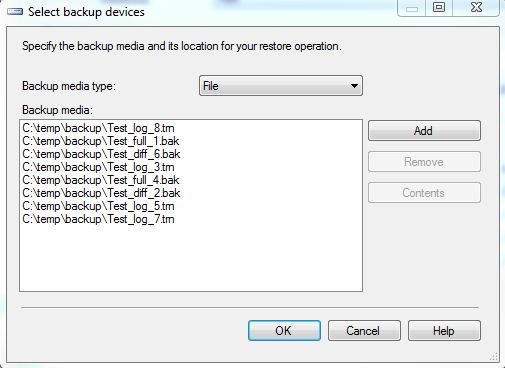
4. in the restore plan section, it will list the restore plan with the files we need.
if any backup file is missing, the tool will report error that the restore chain is broken.
I think if the file name could be listed in the restore plan as well, that will be great! without the file name, I can not know which files I will use to restore. the only way I can use is script the restore action, and check the script.
Except for improvement of the restore database, there is new UI for page restore as well. I like these improvement for the db restore :)
http://jamessql.blogspot.com/2012/04/generate-restore-script-automatically.html
Obviously, I had not tried restore in SQL Server 2012 Management Studio at that time. Now we have SQL 2012, which can provide more powerful ways to restore database. let's run the test script first.
==================================
--Create Test database
CREATE DATABASE [Test]
CONTAINMENT = NONE
ON PRIMARY
( NAME = N'Test', FILENAME = N'C:\Program Files\Microsoft SQL Server\MSSQL11.SQL2012\MSSQL\DATA\Test.mdf' , SIZE = 5120KB , FILEGROWTH = 1024KB )
LOG ON
( NAME = N'Test_log', FILENAME = N'C:\Program Files\Microsoft SQL Server\MSSQL11.SQL2012\MSSQL\DATA\Test_log.ldf' , SIZE = 1024KB , FILEGROWTH = 10%)
GO
ALTER DATABASE [Test] SET RECOVERY FULL
GO
ALTER DATABASE [Test] SET PAGE_VERIFY CHECKSUM
GO
ALTER DATABASE [Test] SET TARGET_RECOVERY_TIME = 0 SECONDS
GO
SET NOCOUNT ON
GO
USE [Test]
GO
--Create TABLE
create table mytest (a int, b char(10))
go
--Create full backup
Print convert(varchar(101),getdate(),113)
Print '--Created full backup 1'
backup database [Test] to disk = 'C:\temp\backup\Test_full_1.bak'
go
waitfor DELAY '0:01:00'
Print convert(varchar(101),getdate(),113)
Print '--Insert batch - 1'
go
insert into mytest values(1, '1')
go 5
waitfor DELAY '0:01:00'
Print convert(varchar(101),getdate(),113)
Print '----Create diff backup 2'
backup database [Test] to disk = 'C:\temp\backup\Test_diff_2.bak' WITH DIFFERENTIAL
go
waitfor DELAY '0:01:00'
Print convert(varchar(101),getdate(),113)
Print '--Insert batch - 2'
go
insert into mytest values(2, '2')
go 5
Print convert(varchar(101),getdate(),113)
Print '------Create Log backup 3'
BACKUP LOG [Test] TO DISK = N'C:\temp\backup\Test_log_3.trn'
go
waitfor DELAY '0:01:00'
Print convert(varchar(101),getdate(),113)
Print '--Insert batch - 3'
go
insert into mytest values(3, '3')
go 5
Print convert(varchar(101),getdate(),113)
Print '--Created full backup 4'
backup database [Test] to disk = 'C:\temp\backup\Test_full_4.bak'
go
waitfor DELAY '0:01:00'
Print convert(varchar(101),getdate(),113)
Print '--Insert batch - 4'
go
insert into mytest values(4, '4')
go 5
Print convert(varchar(101),getdate(),113)
Print '------Create Log backup 5'
BACKUP LOG [Test] TO DISK = N'C:\temp\backup\Test_log_5.trn'
go
waitfor DELAY '0:01:00'
Print convert(varchar(101),getdate(),113)
Print '--Insert batch - 5'
go
insert into mytest values(5, '5')
go 5
Print convert(varchar(101),getdate(),113)
Print '----Create diff backup 6'
backup database [Test] to disk = 'C:\temp\backup\Test_diff_6.bak' WITH DIFFERENTIAL
go
waitfor DELAY '0:01:00'
Print convert(varchar(101),getdate(),113)
Print '--Insert batch - 6'
go
insert into mytest values(6, '6')
go 5
Print convert(varchar(101),getdate(),113)
Print '------Create Log backup 7'
BACKUP LOG [Test] TO DISK = N'C:\temp\backup\Test_log_7.trn'
go
waitfor DELAY '0:01:00'
Print convert(varchar(101),getdate(),113)
Print '--Insert batch - 7'
go
insert into mytest values(7, '7')
go 5
Print convert(varchar(101),getdate(),113)
Print '------Create Log backup 8'
BACKUP LOG [Test] TO DISK = N'C:\temp\backup\Test_log_8.trn'
go
waitfor DELAY '0:01:00'
Print convert(varchar(101),getdate(),113)
Print '--Insert batch - 8'
go
insert into mytest values(8, '8')
go 5
GO
==================================
We created database "Test", inserted data and generated full/diff/log backup. In SSMS, right click database "Test", and select "Task"->"Restore"->"Database", the new UI popup

1. At the top of the window, there is message which notice you that a tail-log backup will be taken by default. That's a nice option, if you want to recover database to current point, a tail-log backup of current active database is necessary.
In the "Option" page, you can set the path of the tail-log backup file.
2. You can select restore source from
- Database: which get the restore information from msdb backup history tables.
- Device: which get the restore information from backup file header
4. According to the source you select, the restore window will auto list all backup files which meet your requirement( which time point you want to restore).
In our sample, it listed last full backup +diff+2 log backup.
5. before you restore, you can click "Verify Backup Media" button to verify if backup file is corrupted. That's really helpful when you try to restore many files, but if the size of the files are big, it will take long time to verify.
6. In Files page, here is a enhancement, you can change the location of all files, it is convenient if you have multi-files.
7. In "options" page, we can set the path of tail-log backup file. since we restore test database to a new database TestDB, so we unchecked the "Leave source database in the restoring state" option.
Click OK, the new database testdb will be restored, however, you will not find data batch 8 in the mytest table, because we didn't restore trail-log backup.
Next, let's try restore to time point.
1. Click the "TimeLine..." button to open the Backup timeline window. here you can set the specific date and time.
2. Click OK and return to the restore window, in the restore plan section, it will list all backup files auto. that's really nice.
Last, let's try to restore database with the backup files directly.
1. Drop the Test Database with all backup history in msdb
EXEC msdb.dbo.sp_delete_database_backuphistory @database_name = N'Test'
GO
USE [master]
GO
ALTER DATABASE [Test] SET SINGLE_USER WITH ROLLBACK IMMEDIATE
GO
USE [master]
GO
DROP DATABASE [Test]
GO
2. Click "Restore Databases" to open the restore db window, and select "Device" in Source section.
3. add all backup files, click ok
4. in the restore plan section, it will list the restore plan with the files we need.
if any backup file is missing, the tool will report error that the restore chain is broken.
I think if the file name could be listed in the restore plan as well, that will be great! without the file name, I can not know which files I will use to restore. the only way I can use is script the restore action, and check the script.
Except for improvement of the restore database, there is new UI for page restore as well. I like these improvement for the db restore :)
Sunday, August 12, 2012
Monitor Deadlock in SQL 2012
Do you still use trace flag 1204 and 1222 to monitor Deadlock? or using profile to capture deadlock? Now we are in SQL Server 2012! One of the biggest improvement of SQL 2012 is Extended Events.
Extended Events can replace SQL Profiler, and it is more powerful with less performance impact than SQL Profiler. Extended Events has been introduced in SQL Server world from SQL2008, and in SQL2012, it has been integrated into SQL Server Management Studio(SSMS), see the pic below:

Now you can use SSMS to manage your Extends Events session. By default, there are 2 session created, "AlwaysOn_health" and "system_health", and "system_health" is started when SQL Service startup. You can script the session and check the defination:
CREATE EVENT SESSION [system_health] ON SERVER
ADD EVENT sqlclr.clr_allocation_failure(
ACTION(package0.callstack,sqlserver.session_id)),
ADD EVENT sqlclr.clr_virtual_alloc_failure(
ACTION(package0.callstack,sqlserver.session_id)),
ADD EVENT sqlos.memory_broker_ring_buffer_recorded,
ADD EVENT sqlos.memory_node_oom_ring_buffer_recorded(
ACTION(package0.callstack,sqlserver.session_id,sqlserver.sql_text,sqlserver.tsql_stack)),
ADD EVENT sqlos.scheduler_monitor_deadlock_ring_buffer_recorded,
ADD EVENT sqlos.scheduler_monitor_non_yielding_iocp_ring_buffer_recorded,
ADD EVENT sqlos.scheduler_monitor_non_yielding_ring_buffer_recorded,
ADD EVENT sqlos.scheduler_monitor_non_yielding_rm_ring_buffer_recorded,
ADD EVENT sqlos.scheduler_monitor_stalled_dispatcher_ring_buffer_recorded,
ADD EVENT sqlos.scheduler_monitor_system_health_ring_buffer_recorded,
ADD EVENT sqlos.wait_info(
ACTION(package0.callstack,sqlserver.session_id,sqlserver.sql_text)
WHERE ([duration]>(15000) AND ([wait_type]>(31) AND ([wait_type]>(47) AND [wait_type]<(54) OR [wait_type]<(38) OR [wait_type]>(63) AND [wait_type]<(70) OR [wait_type]>(96) AND [wait_type]<(100) OR [wait_type]=(107) OR [wait_type]=(113) OR [wait_type]>(174) AND [wait_type]<(179) OR [wait_type]=(186) OR [wait_type]=(207) OR [wait_type]=(269) OR [wait_type]=(283) OR [wait_type]=(284)) OR [duration]>(30000) AND [wait_type]<(22)))),
ADD EVENT sqlos.wait_info_external(
ACTION(package0.callstack,sqlserver.session_id,sqlserver.sql_text)
WHERE ([duration]>(5000) AND ([wait_type]>(365) AND [wait_type]<(372) OR [wait_type]>(372) AND [wait_type]<(377) OR [wait_type]>(377) AND [wait_type]<(383) OR [wait_type]>(420) AND [wait_type]<(424) OR [wait_type]>(426) AND [wait_type]<(432) OR [wait_type]>(432) AND [wait_type]<(435) OR [duration]>(45000) AND ([wait_type]>(382) AND [wait_type]<(386) OR [wait_type]>(423) AND [wait_type]<(427) OR [wait_type]>(434) AND [wait_type]<(437) OR [wait_type]>(442) AND [wait_type]<(451) OR [wait_type]>(451) AND [wait_type]<(473) OR [wait_type]>(484) AND [wait_type]<(499) OR [wait_type]=(365) OR [wait_type]=(372) OR [wait_type]=(377) OR [wait_type]=(387) OR [wait_type]=(432) OR [wait_type]=(502))))),
ADD EVENT sqlserver.connectivity_ring_buffer_recorded(SET collect_call_stack=(1)),
ADD EVENT sqlserver.error_reported(
ACTION(package0.callstack,sqlserver.database_id,sqlserver.session_id,sqlserver.sql_text,sqlserver.tsql_stack)
WHERE ([severity]>=(20) OR ([error_number]=(17803) OR [error_number]=(701) OR [error_number]=(802) OR [error_number]=(8645) OR [error_number]=(8651) OR [error_number]=(8657) OR [error_number]=(8902)))),
ADD EVENT sqlserver.security_error_ring_buffer_recorded(SET collect_call_stack=(1)),
ADD EVENT sqlserver.sp_server_diagnostics_component_result(SET collect_data=(1)
WHERE ([sqlserver].[is_system]=(1) AND [component]<>(4))),
ADD EVENT sqlserver.xml_deadlock_report
ADD TARGET package0.event_file(SET filename=N'system_health.xel',max_file_size=(5),max_rollover_files=(4)),
ADD TARGET package0.ring_buffer(SET max_events_limit=(5000),max_memory=(4096))
WITH (MAX_MEMORY=4096 KB,EVENT_RETENTION_MODE=ALLOW_SINGLE_EVENT_LOSS,MAX_DISPATCH_LATENCY=120 SECONDS,MAX_EVENT_SIZE=0 KB,MEMORY_PARTITION_MODE=NONE,TRACK_CAUSALITY=OFF,STARTUP_STATE=OFF)
GO
So "system_health" will monitor the deadlock event by default. let's try the script below to generate deadlock scenario
====================================================
--create table
create table a1(a int)
create table b1(b int)
insert into a1 values(1)
insert into b1 values(1)
--run in first session
select @@SPID
begin tran
update a1 set a=2
update b1 set b=2
--run in second session
select @@SPID
begin tran
update b1 set b=2
update a1 set a=2
====================================================
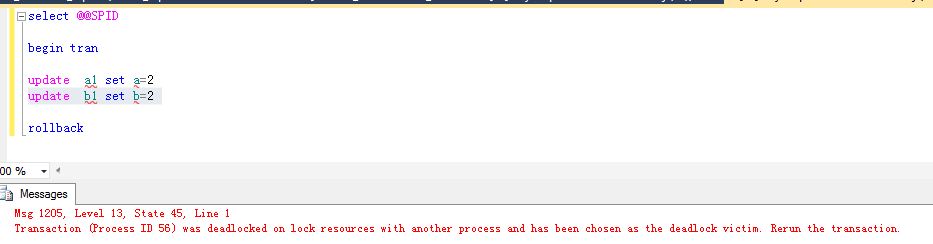
Congrat, you got deadlock and saw the error below
Go back to SSMS,

double click the "package0.event_file" under "system_health", you can review all the event just like below:

<victimProcess id="process2ed016558" />
</victim-list>
<process-list>
<process id="process2ed016558" taskpriority="0" logused="248" waitresource="RID: 6:1:169:0" waittime="3029" ownerId="54473" transactionname="user_transaction" lasttranstarted="2012-08-12T18:59:15.827" XDES="0x2f8252d28" lockMode="U" schedulerid="3" kpid="4852" status="suspended" spid="56" sbid="0" ecid="0" priority="0" trancount="2" lastbatchstarted="2012-08-12T18:59:23.397" lastbatchcompleted="2012-08-12T18:59:15.830" lastattention="1900-01-01T00:00:00.830" clientapp="Microsoft SQL Server Management Studio - Query" hostname="V-XUJ1230" hostpid="5688" loginname="FAREAST\v-xuj" isolationlevel="read committed (2)" xactid="54473" currentdb="6" lockTimeout="4294967295" clientoption1="671090784" clientoption2="390200">
<executionStack>
<frame procname="adhoc" line="1" stmtstart="16" sqlhandle="0x020000006377082c50d69d2e5f1de789330d2a1e2eda81960000000000000000000000000000000000000000">
UPDATE [b1] set [b] = @1 </frame>
<frame procname="adhoc" line="1" sqlhandle="0x0200000055304113cb84f9da843e5bdb59f3c2ace4f8aadd0000000000000000000000000000000000000000">
update b1 set b=2 </frame>
</executionStack>
<inputbuf>
update b1 set b=2
</inputbuf>
</process>
<process id="process2ed0170c8" taskpriority="0" logused="248" waitresource="RID: 6:1:166:0" waittime="6233" ownerId="54474" transactionname="user_transaction" lasttranstarted="2012-08-12T18:59:18.503" XDES="0x2f82523a8" lockMode="U" schedulerid="3" kpid="1456" status="suspended" spid="52" sbid="0" ecid="0" priority="0" trancount="2" lastbatchstarted="2012-08-12T18:59:20.210" lastbatchcompleted="2012-08-12T18:59:18.503" lastattention="1900-01-01T00:00:00.503" clientapp="Microsoft SQL Server Management Studio - Query" hostname="V-XUJ1230" hostpid="5688" loginname="FAREAST\v-xuj" isolationlevel="read committed (2)" xactid="54474" currentdb="6" lockTimeout="4294967295" clientoption1="671090784" clientoption2="390200">
<executionStack>
<frame procname="adhoc" line="1" stmtstart="16" sqlhandle="0x020000005cdb030dd161d461be83dc620591979030bbf17f0000000000000000000000000000000000000000">
UPDATE [a1] set [a] = @1 </frame>
<frame procname="adhoc" line="1" sqlhandle="0x020000008278b7001a4bf6c0edd6eb92e71651f531b4b9da0000000000000000000000000000000000000000">
update a1 set a=2 </frame>
</executionStack>
<inputbuf>
update a1 set a=2
</inputbuf>
</process>
</process-list>
<resource-list>
<ridlock fileid="1" pageid="169" dbid="6" objectname="CDBTEST.dbo.b1" id="lock2f4b46480" mode="X" associatedObjectId="72057594039107584">
<owner-list>
<owner id="process2ed0170c8" mode="X" />
</owner-list>
<waiter-list>
<waiter id="process2ed016558" mode="U" requestType="wait" />
</waiter-list>
</ridlock>
<ridlock fileid="1" pageid="166" dbid="6" objectname="CDBTEST.dbo.a1" id="lock2f4b49180" mode="X" associatedObjectId="72057594039042048">
<owner-list>
<owner id="process2ed016558" mode="X" />
</owner-list>
<waiter-list>
<waiter id="process2ed0170c8" mode="U" requestType="wait" />
</waiter-list>
</ridlock>
</resource-list>
</deadlock>
==============================================
Extended Events can replace SQL Profiler, and it is more powerful with less performance impact than SQL Profiler. Extended Events has been introduced in SQL Server world from SQL2008, and in SQL2012, it has been integrated into SQL Server Management Studio(SSMS), see the pic below:

CREATE EVENT SESSION [system_health] ON SERVER
ADD EVENT sqlclr.clr_allocation_failure(
ACTION(package0.callstack,sqlserver.session_id)),
ADD EVENT sqlclr.clr_virtual_alloc_failure(
ACTION(package0.callstack,sqlserver.session_id)),
ADD EVENT sqlos.memory_broker_ring_buffer_recorded,
ADD EVENT sqlos.memory_node_oom_ring_buffer_recorded(
ACTION(package0.callstack,sqlserver.session_id,sqlserver.sql_text,sqlserver.tsql_stack)),
ADD EVENT sqlos.scheduler_monitor_deadlock_ring_buffer_recorded,
ADD EVENT sqlos.scheduler_monitor_non_yielding_iocp_ring_buffer_recorded,
ADD EVENT sqlos.scheduler_monitor_non_yielding_ring_buffer_recorded,
ADD EVENT sqlos.scheduler_monitor_non_yielding_rm_ring_buffer_recorded,
ADD EVENT sqlos.scheduler_monitor_stalled_dispatcher_ring_buffer_recorded,
ADD EVENT sqlos.scheduler_monitor_system_health_ring_buffer_recorded,
ADD EVENT sqlos.wait_info(
ACTION(package0.callstack,sqlserver.session_id,sqlserver.sql_text)
WHERE ([duration]>(15000) AND ([wait_type]>(31) AND ([wait_type]>(47) AND [wait_type]<(54) OR [wait_type]<(38) OR [wait_type]>(63) AND [wait_type]<(70) OR [wait_type]>(96) AND [wait_type]<(100) OR [wait_type]=(107) OR [wait_type]=(113) OR [wait_type]>(174) AND [wait_type]<(179) OR [wait_type]=(186) OR [wait_type]=(207) OR [wait_type]=(269) OR [wait_type]=(283) OR [wait_type]=(284)) OR [duration]>(30000) AND [wait_type]<(22)))),
ADD EVENT sqlos.wait_info_external(
ACTION(package0.callstack,sqlserver.session_id,sqlserver.sql_text)
WHERE ([duration]>(5000) AND ([wait_type]>(365) AND [wait_type]<(372) OR [wait_type]>(372) AND [wait_type]<(377) OR [wait_type]>(377) AND [wait_type]<(383) OR [wait_type]>(420) AND [wait_type]<(424) OR [wait_type]>(426) AND [wait_type]<(432) OR [wait_type]>(432) AND [wait_type]<(435) OR [duration]>(45000) AND ([wait_type]>(382) AND [wait_type]<(386) OR [wait_type]>(423) AND [wait_type]<(427) OR [wait_type]>(434) AND [wait_type]<(437) OR [wait_type]>(442) AND [wait_type]<(451) OR [wait_type]>(451) AND [wait_type]<(473) OR [wait_type]>(484) AND [wait_type]<(499) OR [wait_type]=(365) OR [wait_type]=(372) OR [wait_type]=(377) OR [wait_type]=(387) OR [wait_type]=(432) OR [wait_type]=(502))))),
ADD EVENT sqlserver.connectivity_ring_buffer_recorded(SET collect_call_stack=(1)),
ADD EVENT sqlserver.error_reported(
ACTION(package0.callstack,sqlserver.database_id,sqlserver.session_id,sqlserver.sql_text,sqlserver.tsql_stack)
WHERE ([severity]>=(20) OR ([error_number]=(17803) OR [error_number]=(701) OR [error_number]=(802) OR [error_number]=(8645) OR [error_number]=(8651) OR [error_number]=(8657) OR [error_number]=(8902)))),
ADD EVENT sqlserver.security_error_ring_buffer_recorded(SET collect_call_stack=(1)),
ADD EVENT sqlserver.sp_server_diagnostics_component_result(SET collect_data=(1)
WHERE ([sqlserver].[is_system]=(1) AND [component]<>(4))),
ADD EVENT sqlserver.xml_deadlock_report
ADD TARGET package0.event_file(SET filename=N'system_health.xel',max_file_size=(5),max_rollover_files=(4)),
ADD TARGET package0.ring_buffer(SET max_events_limit=(5000),max_memory=(4096))
WITH (MAX_MEMORY=4096 KB,EVENT_RETENTION_MODE=ALLOW_SINGLE_EVENT_LOSS,MAX_DISPATCH_LATENCY=120 SECONDS,MAX_EVENT_SIZE=0 KB,MEMORY_PARTITION_MODE=NONE,TRACK_CAUSALITY=OFF,STARTUP_STATE=OFF)
GO
So "system_health" will monitor the deadlock event by default. let's try the script below to generate deadlock scenario
====================================================
--create table
create table a1(a int)
create table b1(b int)
insert into a1 values(1)
insert into b1 values(1)
--run in first session
select @@SPID
begin tran
update a1 set a=2
update b1 set b=2
--run in second session
select @@SPID
begin tran
update b1 set b=2
update a1 set a=2
====================================================
Congrat, you got deadlock and saw the error below
Go back to SSMS,
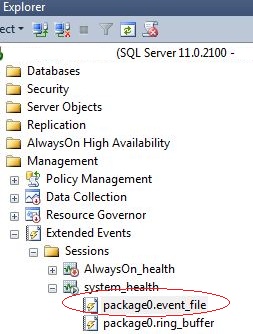
double click the "package0.event_file" under "system_health", you can review all the event just like below:
Double Click "Value" to check the deadlock detail, here you can find the process and resource info for the deadlock
==============================================
<deadlock>
<victim-list><victimProcess id="process2ed016558" />
</victim-list>
<process-list>
<process id="process2ed016558" taskpriority="0" logused="248" waitresource="RID: 6:1:169:0" waittime="3029" ownerId="54473" transactionname="user_transaction" lasttranstarted="2012-08-12T18:59:15.827" XDES="0x2f8252d28" lockMode="U" schedulerid="3" kpid="4852" status="suspended" spid="56" sbid="0" ecid="0" priority="0" trancount="2" lastbatchstarted="2012-08-12T18:59:23.397" lastbatchcompleted="2012-08-12T18:59:15.830" lastattention="1900-01-01T00:00:00.830" clientapp="Microsoft SQL Server Management Studio - Query" hostname="V-XUJ1230" hostpid="5688" loginname="FAREAST\v-xuj" isolationlevel="read committed (2)" xactid="54473" currentdb="6" lockTimeout="4294967295" clientoption1="671090784" clientoption2="390200">
<executionStack>
<frame procname="adhoc" line="1" stmtstart="16" sqlhandle="0x020000006377082c50d69d2e5f1de789330d2a1e2eda81960000000000000000000000000000000000000000">
UPDATE [b1] set [b] = @1 </frame>
<frame procname="adhoc" line="1" sqlhandle="0x0200000055304113cb84f9da843e5bdb59f3c2ace4f8aadd0000000000000000000000000000000000000000">
update b1 set b=2 </frame>
</executionStack>
<inputbuf>
update b1 set b=2
</inputbuf>
</process>
<process id="process2ed0170c8" taskpriority="0" logused="248" waitresource="RID: 6:1:166:0" waittime="6233" ownerId="54474" transactionname="user_transaction" lasttranstarted="2012-08-12T18:59:18.503" XDES="0x2f82523a8" lockMode="U" schedulerid="3" kpid="1456" status="suspended" spid="52" sbid="0" ecid="0" priority="0" trancount="2" lastbatchstarted="2012-08-12T18:59:20.210" lastbatchcompleted="2012-08-12T18:59:18.503" lastattention="1900-01-01T00:00:00.503" clientapp="Microsoft SQL Server Management Studio - Query" hostname="V-XUJ1230" hostpid="5688" loginname="FAREAST\v-xuj" isolationlevel="read committed (2)" xactid="54474" currentdb="6" lockTimeout="4294967295" clientoption1="671090784" clientoption2="390200">
<executionStack>
<frame procname="adhoc" line="1" stmtstart="16" sqlhandle="0x020000005cdb030dd161d461be83dc620591979030bbf17f0000000000000000000000000000000000000000">
UPDATE [a1] set [a] = @1 </frame>
<frame procname="adhoc" line="1" sqlhandle="0x020000008278b7001a4bf6c0edd6eb92e71651f531b4b9da0000000000000000000000000000000000000000">
update a1 set a=2 </frame>
</executionStack>
<inputbuf>
update a1 set a=2
</inputbuf>
</process>
</process-list>
<resource-list>
<ridlock fileid="1" pageid="169" dbid="6" objectname="CDBTEST.dbo.b1" id="lock2f4b46480" mode="X" associatedObjectId="72057594039107584">
<owner-list>
<owner id="process2ed0170c8" mode="X" />
</owner-list>
<waiter-list>
<waiter id="process2ed016558" mode="U" requestType="wait" />
</waiter-list>
</ridlock>
<ridlock fileid="1" pageid="166" dbid="6" objectname="CDBTEST.dbo.a1" id="lock2f4b49180" mode="X" associatedObjectId="72057594039042048">
<owner-list>
<owner id="process2ed016558" mode="X" />
</owner-list>
<waiter-list>
<waiter id="process2ed0170c8" mode="U" requestType="wait" />
</waiter-list>
</ridlock>
</resource-list>
</deadlock>
==============================================
or you can click the "Deadlock" TAB to see the diagram.
Saturday, July 7, 2012
Backup Master Database
The story came from a question someone asked me.
Does Master database support full recovery mode?
As I remembered, by default, Master database is in "Simple" recovery mode. I never try to put it into Full recovery mode because master database is not updated frequently, and it is very small. I only use daily backup for master database.
Here is the database properties page of master database on SQL Server 2008 R2.

So we can change it recovery mode to "FULL", but does it really work? I tried to backup it by SSMS

Well, I can only select "FULL" backup type. How about run backup command?
BACKUP DATABASE [Master] TO DISK = N'C:\master.dif' WITH DIFFERENTIAL
GO
I got error:
Msg 3024, Level 16, State 0, Line 1
You can only perform a full backup of the master database. Use BACKUP DATABASE to back up the entire master database.
Msg 3013, Level 16, State 1, Line 1
BACKUP DATABASE is terminating abnormally.
In SQL BOL, http://msdn.microsoft.com/en-us/library/ms365937(v=sql.105).aspx, for master database:
For backwards compatibility with earlier versions of Microsoft SQL Server, the recovery model of master can be set to FULL or BULK_LOGGED. However, BACKUP LOG is not supported for master. Therefore, even if the recovery model of master is changed to full or bulk-logged, the database continues to operate as if it were using the simple recovery model.
Forget mentioning that
Not only transaction log backup, but also differential backup can not be run on master database. Why? because you can not restore master database with norecovery mode, without norecovery, why we need to keep differential backup and log backup? :)
Master database contains the data blow
1. Login account info
2. System parameter (sp_configure)
3. Database info
4. Server objects, for instance the linked server, system trigger.
5. Other server level security info
So except for the regular backup, you need to take a full database backup after you change the data upper. However, if you maintain the system for customer, you will not be notified when customer change the master database. If the server is corrupted, as there is no differential and log backup for master database, you can not restore the database to point of time, there will be data lost.
I was thinking if there is an appropriate way to backup the master database automatically after any change.The first thing is we need to capture the change event .
1. Using system trigger monitor the event.
DDL trigger can monitor the server level DDL, using the script below can list all the DDL trigger hierarchically
================================
;WITH EVENTCATALOG([TYPE],[TYPE_NAME], [PARENT_NAME], LEVEL)
AS
(
SELECT [TYPE]
,[TYPE_NAME]
,[TYPE_NAME] AS PARENT_NAME
,0 AS LEVEL
FROM SYS.trigger_event_types
WHERE TYPE=10002 OR TYPE=296
UNION ALL
SELECT
TET.TYPE
,TET.TYPE_NAME
,EC.TYPE_NAME AS PARENT_NAME
,EC.LEVEL+1 AS LEVEL
FROM SYS.trigger_event_types TET
INNER JOIN EVENTCATALOG EC ON TET.parent_type=EC.TYPE
)
SELECT [TYPE],[TYPE_NAME], [PARENT_NAME], LEVEL
FROM EVENTCATALOG ORDER BY LEVEL, TYPE_NAME
================================
So we just need to create ddl trigger for the root event ALTER_SERVER_CONFIGURATION and DDL_SERVER_LEVEL_EVENTS. However, event ALTER_SERVER_CONFIGURATION cannot be monitored, fortunately, we don't need to run "ALTER SERVER CONFIGURATION" or SP_CONFIGURE frequently, so monitor event DDL_SERVER_LEVEL_EVENTS is enough. here is the sample code
================================
SET ANSI_NULLS ON
GO
SET QUOTED_IDENTIFIER ON
GO
CREATE TRIGGER [SystemTrigger] ON ALL SERVER
FOR DDL_SERVER_LEVEL_EVENTS
AS
DECLARE @data XML;
DECLARE @eventtype sysname;
DECLARE @PostTime sysname;
DECLARE @LoginName sysname;
DECLARE @UserName sysname;
DECLARE @object sysname;
DECLARE @tsql sysname;
DECLARE @message varchar(max);
DECLARE @path varchar(200);
SET @data = EVENTDATA();
SET @eventType = @data.value('(/EVENT_INSTANCE/EventType)[1]', 'sysname')
SET @PostTime = @data.value('(/EVENT_INSTANCE/PostTime)[1]','sysname')
SET @LoginName = @data.value('(/EVENT_INSTANCE/LoginName)[1]','sysname')
SET @UserName = @data.value('(/EVENT_INSTANCE/UserName)[1]','sysname')
SET @object = @data.value('(/EVENT_INSTANCE/DatabaseName)[1]','sysname')
SET @tsql=EVENTDATA().value('(/EVENT_INSTANCE/TSQLCommand/CommandText)[1]','nvarchar(max)')
SET @message=' On server '+ @@servername+ ' login name '+ isnull(@LoginName,'UNKNOWN')+',user '
+ISNULL(@UserName,'UNKNOWN')+' run the command '+ isnull(@eventType, 'Unknown Database Operation')
+ ' on database '+ISNULL(@object,'UNKNOWN')+' at '+ISNULL(@PostTime,'UNKNOWN') + '. '
SET @message=@message + 'SQL Command is:'
SET @message=@message + isnull(@tsql,'')
raiserror (@message, 0, 0) with log
GO
SET ANSI_NULLS OFF
GO
SET QUOTED_IDENTIFIER OFF
GO
ENABLE TRIGGER [SystemTrigger] ON ALL SERVER
================================
if we run any server level DDL, the command will be logged into sql server errorlog file. Here I dropped a database and detached another one, then in the sql server errorlog, I can find message:

2. Backup master database
In the first step, we capture the system level event, now we need to backup the master database automatically. It is a challenge, because you can not backup database in the DDL trigger. we need to find out another solutions:
a) Call sql job in the DDL Trigger
well, you can create a sql job which backup the master database only without schedule , then start the job from the DDL trigger.
================================
SET ANSI_NULLS ON
GO
SET QUOTED_IDENTIFIER ON
GO
ALTER TRIGGER [SystemTrigger] ON ALL SERVER
FOR DDL_SERVER_LEVEL_EVENTS
AS
DECLARE @data XML;
DECLARE @eventtype sysname;
DECLARE @PostTime sysname;
DECLARE @LoginName sysname;
DECLARE @UserName sysname;
DECLARE @object sysname;
DECLARE @tsql sysname;
DECLARE @message varchar(max);
DECLARE @path varchar(200);
SET @data = EVENTDATA();
SET @eventType = @data.value('(/EVENT_INSTANCE/EventType)[1]', 'sysname')
SET @PostTime = @data.value('(/EVENT_INSTANCE/PostTime)[1]','sysname')
SET @LoginName = @data.value('(/EVENT_INSTANCE/LoginName)[1]','sysname')
SET @UserName = @data.value('(/EVENT_INSTANCE/UserName)[1]','sysname')
SET @object = @data.value('(/EVENT_INSTANCE/DatabaseName)[1]','sysname')
SET @tsql=EVENTDATA().value('(/EVENT_INSTANCE/TSQLCommand/CommandText)[1]','nvarchar(max)')
SET @message=' On server '+ @@servername+ ' login name '+ isnull(@LoginName,'UNKNOWN')+',user '
+ISNULL(@UserName,'UNKNOWN')+' run the command '+ isnull(@eventType, 'Unknown Database Operation')
+ ' on database '+ISNULL(@object,'UNKNOWN')+' at '+ISNULL(@PostTime,'UNKNOWN') + '. '
SET @message=@message + 'SQL Command is:'
SET @message=@message + isnull(@tsql,'')
WAITFOR DELAY '00:00:02'
EXEC msdb..sp_start_job 'backupmaster'
raiserror (@message, 0, 0) with log;
GO
SET ANSI_NULLS OFF
GO
SET QUOTED_IDENTIFIER OFF
GO
ENABLE TRIGGER [SystemTrigger] ON ALL SERVER
================================
The solution is not perfect, because
By this way, you even don't need DDL Trigger, just create a sql job to backup the master database periodically, maybe 1 minute or 5 minutes. The problem is you will have many backup files for master databases, and backing up master database frequently might have a little bit performance impact. So we can setup the flag in the DDL trigger, have the sql job check the flag, if it is set, then backup the master database.
This solution is also not perfect:
Does Master database support full recovery mode?
As I remembered, by default, Master database is in "Simple" recovery mode. I never try to put it into Full recovery mode because master database is not updated frequently, and it is very small. I only use daily backup for master database.
Here is the database properties page of master database on SQL Server 2008 R2.
So we can change it recovery mode to "FULL", but does it really work? I tried to backup it by SSMS
Well, I can only select "FULL" backup type. How about run backup command?
BACKUP DATABASE [Master] TO DISK = N'C:\master.dif' WITH DIFFERENTIAL
GO
I got error:
Msg 3024, Level 16, State 0, Line 1
You can only perform a full backup of the master database. Use BACKUP DATABASE to back up the entire master database.
Msg 3013, Level 16, State 1, Line 1
BACKUP DATABASE is terminating abnormally.
In SQL BOL, http://msdn.microsoft.com/en-us/library/ms365937(v=sql.105).aspx, for master database:
For backwards compatibility with earlier versions of Microsoft SQL Server, the recovery model of master can be set to FULL or BULK_LOGGED. However, BACKUP LOG is not supported for master. Therefore, even if the recovery model of master is changed to full or bulk-logged, the database continues to operate as if it were using the simple recovery model.
Forget mentioning that
Not only transaction log backup, but also differential backup can not be run on master database. Why? because you can not restore master database with norecovery mode, without norecovery, why we need to keep differential backup and log backup? :)
Master database contains the data blow
1. Login account info
2. System parameter (sp_configure)
3. Database info
4. Server objects, for instance the linked server, system trigger.
5. Other server level security info
So except for the regular backup, you need to take a full database backup after you change the data upper. However, if you maintain the system for customer, you will not be notified when customer change the master database. If the server is corrupted, as there is no differential and log backup for master database, you can not restore the database to point of time, there will be data lost.
I was thinking if there is an appropriate way to backup the master database automatically after any change.The first thing is we need to capture the change event .
1. Using system trigger monitor the event.
DDL trigger can monitor the server level DDL, using the script below can list all the DDL trigger hierarchically
================================
;WITH EVENTCATALOG([TYPE],[TYPE_NAME], [PARENT_NAME], LEVEL)
AS
(
SELECT [TYPE]
,[TYPE_NAME]
,[TYPE_NAME] AS PARENT_NAME
,0 AS LEVEL
FROM SYS.trigger_event_types
WHERE TYPE=10002 OR TYPE=296
UNION ALL
SELECT
TET.TYPE
,TET.TYPE_NAME
,EC.TYPE_NAME AS PARENT_NAME
,EC.LEVEL+1 AS LEVEL
FROM SYS.trigger_event_types TET
INNER JOIN EVENTCATALOG EC ON TET.parent_type=EC.TYPE
)
SELECT [TYPE],[TYPE_NAME], [PARENT_NAME], LEVEL
FROM EVENTCATALOG ORDER BY LEVEL, TYPE_NAME
================================
So we just need to create ddl trigger for the root event ALTER_SERVER_CONFIGURATION and DDL_SERVER_LEVEL_EVENTS. However, event ALTER_SERVER_CONFIGURATION cannot be monitored, fortunately, we don't need to run "ALTER SERVER CONFIGURATION" or SP_CONFIGURE frequently, so monitor event DDL_SERVER_LEVEL_EVENTS is enough. here is the sample code
================================
SET ANSI_NULLS ON
GO
SET QUOTED_IDENTIFIER ON
GO
CREATE TRIGGER [SystemTrigger] ON ALL SERVER
FOR DDL_SERVER_LEVEL_EVENTS
AS
DECLARE @data XML;
DECLARE @eventtype sysname;
DECLARE @PostTime sysname;
DECLARE @LoginName sysname;
DECLARE @UserName sysname;
DECLARE @object sysname;
DECLARE @tsql sysname;
DECLARE @message varchar(max);
DECLARE @path varchar(200);
SET @data = EVENTDATA();
SET @eventType = @data.value('(/EVENT_INSTANCE/EventType)[1]', 'sysname')
SET @PostTime = @data.value('(/EVENT_INSTANCE/PostTime)[1]','sysname')
SET @LoginName = @data.value('(/EVENT_INSTANCE/LoginName)[1]','sysname')
SET @UserName = @data.value('(/EVENT_INSTANCE/UserName)[1]','sysname')
SET @object = @data.value('(/EVENT_INSTANCE/DatabaseName)[1]','sysname')
SET @tsql=EVENTDATA().value('(/EVENT_INSTANCE/TSQLCommand/CommandText)[1]','nvarchar(max)')
SET @message=' On server '+ @@servername+ ' login name '+ isnull(@LoginName,'UNKNOWN')+',user '
+ISNULL(@UserName,'UNKNOWN')+' run the command '+ isnull(@eventType, 'Unknown Database Operation')
+ ' on database '+ISNULL(@object,'UNKNOWN')+' at '+ISNULL(@PostTime,'UNKNOWN') + '. '
SET @message=@message + 'SQL Command is:'
SET @message=@message + isnull(@tsql,'')
raiserror (@message, 0, 0) with log
GO
SET ANSI_NULLS OFF
GO
SET QUOTED_IDENTIFIER OFF
GO
ENABLE TRIGGER [SystemTrigger] ON ALL SERVER
================================
if we run any server level DDL, the command will be logged into sql server errorlog file. Here I dropped a database and detached another one, then in the sql server errorlog, I can find message:
2. Backup master database
In the first step, we capture the system level event, now we need to backup the master database automatically. It is a challenge, because you can not backup database in the DDL trigger. we need to find out another solutions:
a) Call sql job in the DDL Trigger
well, you can create a sql job which backup the master database only without schedule , then start the job from the DDL trigger.
================================
SET ANSI_NULLS ON
GO
SET QUOTED_IDENTIFIER ON
GO
ALTER TRIGGER [SystemTrigger] ON ALL SERVER
FOR DDL_SERVER_LEVEL_EVENTS
AS
DECLARE @data XML;
DECLARE @eventtype sysname;
DECLARE @PostTime sysname;
DECLARE @LoginName sysname;
DECLARE @UserName sysname;
DECLARE @object sysname;
DECLARE @tsql sysname;
DECLARE @message varchar(max);
DECLARE @path varchar(200);
SET @data = EVENTDATA();
SET @eventType = @data.value('(/EVENT_INSTANCE/EventType)[1]', 'sysname')
SET @PostTime = @data.value('(/EVENT_INSTANCE/PostTime)[1]','sysname')
SET @LoginName = @data.value('(/EVENT_INSTANCE/LoginName)[1]','sysname')
SET @UserName = @data.value('(/EVENT_INSTANCE/UserName)[1]','sysname')
SET @object = @data.value('(/EVENT_INSTANCE/DatabaseName)[1]','sysname')
SET @tsql=EVENTDATA().value('(/EVENT_INSTANCE/TSQLCommand/CommandText)[1]','nvarchar(max)')
SET @message=' On server '+ @@servername+ ' login name '+ isnull(@LoginName,'UNKNOWN')+',user '
+ISNULL(@UserName,'UNKNOWN')+' run the command '+ isnull(@eventType, 'Unknown Database Operation')
+ ' on database '+ISNULL(@object,'UNKNOWN')+' at '+ISNULL(@PostTime,'UNKNOWN') + '. '
SET @message=@message + 'SQL Command is:'
SET @message=@message + isnull(@tsql,'')
WAITFOR DELAY '00:00:02'
EXEC msdb..sp_start_job 'backupmaster'
raiserror (@message, 0, 0) with log;
GO
SET ANSI_NULLS OFF
GO
SET QUOTED_IDENTIFIER OFF
GO
ENABLE TRIGGER [SystemTrigger] ON ALL SERVER
================================
The solution is not perfect, because
- The ddl trigger calls sql job to backup the master db, if the job is running, call will be failed, and you will get error message
- If sql agent is not running, the backup doesn't work, and ddl trigger will report error
- Becareful when you use SSMS, for instance, if you create a database from SSMS, the "CREATE_DATABASE" and "ALERT_DATABASE" event will be triggered many times, and the DDL trigger will be run many times as well. You'd better replace the "DDL_SERVER_LEVEL_EVENTS" in the trigger with a smaller scope trigger, like create the trigger only for event "CREATE_DATABASE".
- When calling sql job to backup the master db, it is possible that the trigger hasn't finished but sql job has been run. So it is possible the backup of master db doesn't have the new changes......although it doesn't happen during my testing.
By this way, you even don't need DDL Trigger, just create a sql job to backup the master database periodically, maybe 1 minute or 5 minutes. The problem is you will have many backup files for master databases, and backing up master database frequently might have a little bit performance impact. So we can setup the flag in the DDL trigger, have the sql job check the flag, if it is set, then backup the master database.
This solution is also not perfect:
- More code and more program
- When set the flag, it is possible to cause blocking issue.
- Larger time interval between the change and the master backup.
Sunday, July 1, 2012
New in SQL 2012 (1)
Learning new is a interesting thing. Today I read several posts regarding the SQL Server 2012 new feature:
1. Indirect Checkpoint
Prior to SQL Server 2012, SQL Server Database Engine Support 3 type of checkpoints: Automatic, manual and internal. Now there is a new checkpoint type added : Indirect Checkpoint.
Not like automatic checkpoint(sp_configure 'recovery interval'), Indirect Checkpoing is set on the database level:
ALTER DATABASE [DatabaseName] SET TARGET_RECOVERY_TIME = 15 SECONDS;
By default, the target recovery time is 0, and Indirect Checkpoing is disabled. Here are some excellent posts which is made by MSFT PFE.
http://sqluninterrupted.com/2012/03/19/target_recovery_time-indirect-checkpoint-sql-server-2012/
http://www.sqlserverfaq.net/2012/03/18/185/
http://blogs.technet.com/b/sqlpfeil/archive/2012/06/13/target-recovery-time-new-database-option-in-sql-server-2012.aspx
The design goal of Indirect Checkpoint is to accurately control the recovery time. In some case, Automatic Checkpoint might be able to cause spiky disk io and performance issue.
By setting a smaller value of Target Recovery Time, the Indirect Checkpoint generates much smoother constant checkpoint instead of spiky checkpoint. However the data page is flushed out to disk more frequently, the thoughput will degrade and disk IO workload will be increased. So making a full testing before you apply it on product will be a good idea.
Another change for checkpoint is the FlushCache message in the error log file
Prior to SQL Server 2012, you need to enable it with trace flag 3504. Now SQL Server 2012 add a new check condition logical
If the trace flag is enabled or the checkpoint 'TRUE == IsLong' the message is added to the SQL Server error log.
I got this info from
http://blogs.msdn.com/b/psssql/archive/2012/06/01/how-it-works-when-is-the-flushcache-message-added-to-sql-server-error-log.aspx
I am thinking if Indirect Checkpoint is worth to try in this situation :), so we can smooth out the spiky checkpoint with constant smaller checkpoint
2. Memory Management
This's a big change in SQL Server 2012.
(does it mean multi-page allocations has been moved into buffer pool in SQL 2012? )
If you still use sql server 32bit version, you can not use more than 4GB(32-bit SQL Server on 64-bit OS) memory any more
Refer to
http://blogs.msdn.com/b/sqlosteam/archive/2012/06/20/sql-server-2012-memory-manager-kb-articles.aspx
1. Indirect Checkpoint
Prior to SQL Server 2012, SQL Server Database Engine Support 3 type of checkpoints: Automatic, manual and internal. Now there is a new checkpoint type added : Indirect Checkpoint.
Not like automatic checkpoint(sp_configure 'recovery interval'), Indirect Checkpoing is set on the database level:
ALTER DATABASE [DatabaseName] SET TARGET_RECOVERY_TIME = 15 SECONDS;
By default, the target recovery time is 0, and Indirect Checkpoing is disabled. Here are some excellent posts which is made by MSFT PFE.
http://sqluninterrupted.com/2012/03/19/target_recovery_time-indirect-checkpoint-sql-server-2012/
http://www.sqlserverfaq.net/2012/03/18/185/
http://blogs.technet.com/b/sqlpfeil/archive/2012/06/13/target-recovery-time-new-database-option-in-sql-server-2012.aspx
The design goal of Indirect Checkpoint is to accurately control the recovery time. In some case, Automatic Checkpoint might be able to cause spiky disk io and performance issue.
By setting a smaller value of Target Recovery Time, the Indirect Checkpoint generates much smoother constant checkpoint instead of spiky checkpoint. However the data page is flushed out to disk more frequently, the thoughput will degrade and disk IO workload will be increased. So making a full testing before you apply it on product will be a good idea.
Another change for checkpoint is the FlushCache message in the error log file
2012-05-30 02:01:56.31 spid14s FlushCache: cleaned up 216539 bufs with 154471 writes in 69071 ms (avoided 11796 new dirty bufs) for db 6:0
2012-05-30 02:01:56.31 spid14s average throughput: 24.49 MB/sec, I/O saturation: 68365, context switches 80348 2012-05-30 02:01:56.31 spid14s last target outstanding: 1560, avgWriteLatency 15
Prior to SQL Server 2012, you need to enable it with trace flag 3504. Now SQL Server 2012 add a new check condition logical
If the trace flag is enabled or the checkpoint 'TRUE == IsLong' the message is added to the SQL Server error log.
I got this info from
http://blogs.msdn.com/b/psssql/archive/2012/06/01/how-it-works-when-is-the-flushcache-message-added-to-sql-server-error-log.aspx
I am thinking if Indirect Checkpoint is worth to try in this situation :), so we can smooth out the spiky checkpoint with constant smaller checkpoint
2. Memory Management
This's a big change in SQL Server 2012.
- Multi-Page allocations and CLR allocations are also included in memory limits that are controlled by max server memory (MB) and min server memory (MB).
- Memory_to_reserve value does not include the multi-page allocations
(does it mean multi-page allocations has been moved into buffer pool in SQL 2012? )
- The "awe enabled" SQL Server feature is deprecated
If you still use sql server 32bit version, you can not use more than 4GB(32-bit SQL Server on 64-bit OS) memory any more
- Standard/Business Intelligence Edition support "locked pages" now.
Refer to
http://blogs.msdn.com/b/sqlosteam/archive/2012/06/20/sql-server-2012-memory-manager-kb-articles.aspx
Subscribe to:
Posts (Atom)